
Adobe Photoshop 2026 v27.2.0 Multilingual MacOS
Adobe Photoshop is a renowned classic in the world of photo editing. It offers a wide range of tools that can transform your inspiration into stunning images, photos, compositions, 3D illustrations, paintings, and graphics on any device. Photoshop has become the preferred choice of thousands of creative professionals worldwide. First introduced in 1988, it remains the world’s leading image editing software.
Adobe Photoshop combines powerful creative tools with seamless macOS integration, making it ideal for both professional and amateur designers. Powered by Apple Silicon and Metal GPU acceleration, the software delivers fast performance, smooth brushstrokes, and efficient handling of large, high-resolution images. Its customizable workspace, advanced layer system, and comprehensive selection tools allow users to work with precision and without distortion, while Retina display support ensures sharpness and accuracy in every detail.
In recent updates, Photoshop has incorporated AI-powered features such as Generative Fill, Harmonize, and improved object removal, enabling users to create complex compositions and edits with minimal effort. Integration with Adobe Creative Cloud provides easy access to fonts, cloud documents, and multi-device workflows, so projects can move seamlessly between Mac, iPad, and other devices. With its combination of professional tools, Mac optimization, and AI enhancements, Photoshop remains the ideal solution for photo editing, digital art, and graphic design.
Key Features:
Photoshop for Mac offers a comprehensive set of tools for photo editing, digital art, and design:
Photo Editing and Retouching:
- Healing Brush and Spot Removal: Seamlessly remove blemishes.
- Content-Aware Fill: Intelligently fill selected areas automatically.
- Camera Raw Integration: Edit RAW photos directly with advanced controls.
Layer-Based Editing:
- Non-Destructive Editing: Layers, masks, and adjustment layers enable complex edits without altering the original images.
- Smart Objects: Preserve image quality when scaling, transforming, or applying filters.
Selection Tools:
- Quick Selection and Magic Wand: Easily select objects.
- Select Subject: An AI-powered tool that automatically identifies the main subjects.
- Refine Edge: Perfect for hair, fur, or intricate edges.
Digital Painting and Illustration:
- Brush Engine: Hundreds of customizable brushes for painting, drawing, and texturizing.
- Tablet Compatibility: Full Apple Pencil compatibility via Sidecar and Wacom tablets. Typography and Design
- Advanced text tools for typographic design, including OpenType features, text on paths, and paragraph/character styles.
- Integration with Adobe Fonts for a wide variety of fonts.
3D and Advanced Tools:
- Editing, lighting, and rendering of 3D objects (compatible with Mac via Metal).
- Neural Filters: AI-powered effects such as style transfer, coloring, and skin smoothing.
Export and Workflow:
- Export in multiple formats, including JPEG, PNG, TIFF, PSD, PDF, and SVG.
- Cloud integration for storage, file sharing, and collaboration in Adobe Creative Cloud.
- Automation via Actions, Scripts, and Batch Processing for repetitive tasks.
What’s New?
AI-Powered Generation and Editing:
- Multiple AI Models: Now you can choose from different AI models for generative edits, offering styles ranging from realistic to artistic.
- Generative Fill Enhancements: Faster and more natural object removal and background generation using AI.
- Harmonize Tool: Automatically blend objects, people, and layers in a scene, combining lighting, shadows, and color for seamless compositions.
Creative and Workflow Enhancements:
- AI-Powered Upscaling for Partners: AI-based upscaling and denoising produce high-resolution images without losing detail.
- Enhanced Adjustment Layers: More precise color, saturation, and temperature controls directly in Photoshop.
- Project Workspace: Organize multiple documents and assets in a central workspace for easier project management.
- Firefly Integration: Import and refine images generated by Adobe Firefly directly in Photoshop.
Selection and Precision Tools:
- Selection Brush Enhancements: Greater precision for selecting complex objects.
- Improved Object and Subject Selection: AI-powered automatic selections are faster and more accurate.
- Text and Typography Enhancements: Better font navigation, multi-language support, and improved typography controls.
Performance and Technical Features:
- Optimizations for macOS: Native Apple Silicon (M1/M2) support and Metal GPU acceleration improve speed and efficiency.
- 32-bit HDR Support: Edit high dynamic range images without reducing bit depth.
- Faster Export and Sharing: Greater control over export formats, resolution, and workflows.
Cross-Platform and Mobile:
- Enhanced Photoshop mobile apps now enable essential editing and cloud-based workflow synchronization across devices.
- Cloud integration facilitates seamless collaboration: Start a project on your Mac and continue on your iPad or mobile device.
You may also Download:
System Requirements:
- Processor: Multicore Intel or Apple Silicon (M1/M2)
- Operating System: macOS Ventura (13) or later
- RAM: 8 GB
- Graphics (GPU): GPU with Metal support, approximately 1.5 GB VRAM
- Display: 1024 × 768 or higher
Advantages of the Free Version of Adobe Photoshop:
- Market Leader
- Versatile Software
- Intuitive Layer Management
- Numerous Design Tools
- Higher Image Resolution
- Compatible with All Image Formats
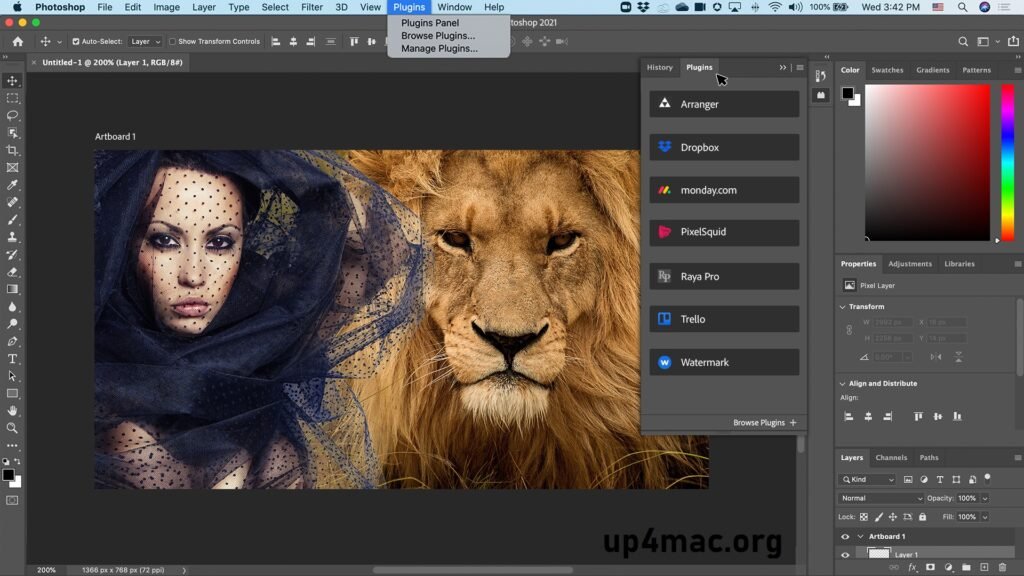
- Numerous Free Tutorials and Plugins
- Ideal for Creating Photomontages
- 3D Design Creation
Pros and Cons:
Pros::
- Industry-standard tool with unparalleled features.
- Optimized for Mac hardware (Apple Silicon, Retina, Metal).
- Extensive AI-powered tools, such as neural filters.
- Strong community and plugin ecosystem.
Cons:
- Steep learning curve for beginners.
- Subscription price can be high.
- Can be resource-intensive on older Macs.
Homepage:https://up4mac.org/
Leave a Reply