
Boxy SVG 4.94.0 for MacOS Download [Latest 2026]

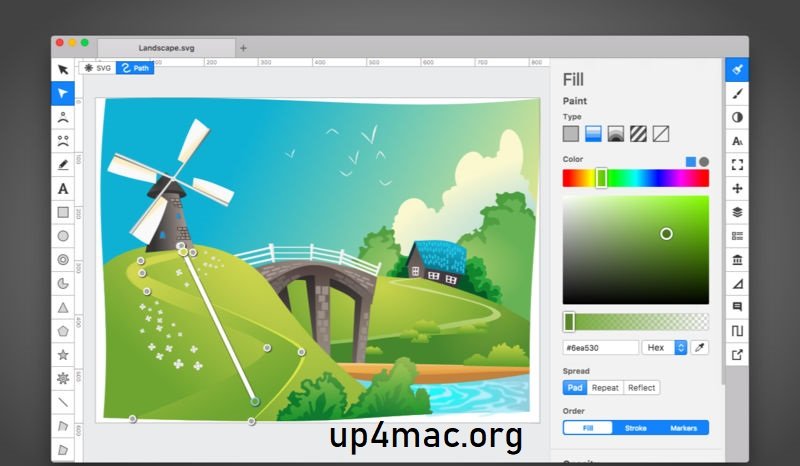
Boxy SVG for Mac is a powerful and lightweight vector graphics editor designed specifically for creating and editing SVG (Scalable Vector Graphics) files. Unlike traditional graphic design tools that support multiple formats, Boxy SVG focuses exclusively on the SVG format, making it ideal for web designers, UI/UX professionals, and developers who prioritize clarity and adherence to vector graphics standards.
With version 4.94.0, Boxy SVG for Mac has established itself as one of the most powerful SVG editors for macOS. It offers a clean interface, high-performance rendering, and advanced editing tools without the complexity of larger graphics suites. This allows users to create precise vector illustrations, icons, diagrams, and UI elements with complete control over the SVG code and structure.
Furthermore, Boxy SVG for Mac is known for its balance of simplicity and professional features. It supports modern web standards, integrates seamlessly with macOS, and offers cloud synchronization for a smooth workflow across all your devices. Therefore, whether you’re a beginner or an experienced designer, Boxy SVG provides a reliable environment for producing scalable graphics optimized for the web and digital platforms.
Key Features of Boxy SVG:
Dedicated SVG Editing Environment
One of Boxy SVG’s main advantages is its exclusive focus on SVG files. Unlike generic vector tools, it allows users to work directly with SVG elements, attributes, and structure. This ensures a clean and lightweight final result that fully complies with web standards.
Advanced Vector Drawing Tools
Boxy SVG for Mac includes a comprehensive set of drawing tools, such as:
- Pen and Bézier tools for precise drawing
- Shape tools for rectangles, circles, and polygons
- Node editing for precise control
- Boolean operations for complex shapes
This allows designers to easily create everything from simple icons to detailed illustrations.
Real-Time SVG Code Editing
A standout feature is the integrated code editor, which displays SVG markup in real time. Users can modify attributes such as fill, stroke, gradients, and transformations directly from the code view. This feature is especially useful for developers who require precise pixel control and optimized SVG rendering.
Layer and Object Management
Boxy SVG supports structured layer management, allowing users to efficiently organize complex designs. Objects can be grouped, locked, hidden, and rearranged, making it easy to manage large projects.
Import and Export Options
The software supports importing formats such as PNG, JPEG, PDF, and AI. Export options include SVG, optimized PNG, and other bitmap formats, making it versatile for both web and print use.
macOS Integration
Boxy SVG for Mac integrates seamlessly with the macOS environment. It supports Retina displays, system fonts, drag-and-drop functionality, and native file management, ensuring a smooth and responsive user experience.
Cloud Sync
With cloud storage support, users can access their projects from multiple devices. This feature is especially useful for professionals working in collaborative or remote environments.
Extensions and Plugins
Boxy SVG supports third-party extensions that enhance its functionality. These include additional export tools, custom filters, and workflow automation features.
What’s New in Boxy SVG 4.94.0?
The latest version of Boxy SVG includes several performance, usability, and compatibility improvements. While previous versions were already stable, version 4.94.0 further optimizes the user experience.
Improved Performance and Stability
This update focuses on optimizing rendering performance, especially when handling large and complex SVG files. Users will benefit from smoother zooming, faster load times, and reduced memory consumption.
More Responsive User Interface
The interface has been improved to offer faster navigation between tools and smoother transitions between panels. This allows designers to work more efficiently without experiencing slowdowns or latency.
Improved Compatibility with SVG Standards
Boxy SVG for Mac improves compatibility with the latest SVG specifications. This ensures better rendering on modern browsers and platforms, a crucial factor for web projects.
Bug Fixes and Security Enhancements
Several minor bugs have been fixed, improving file stability and preventing unexpected crashes. In addition, security fixes improve file management and cloud synchronization security.
Improved Import Compatibility
The new version improves compatibility when importing files from other vector graphics software. This makes it easier to migrate projects without losing design integrity.
You Can Also Download: ACDSee Photo Studio for Mac
System Requirements:
- Operating System: macOS 12 or later
- Processor: Apple Silicon (M1/M2/M3) or Intel i5 or better
- RAM: 8 GB or more
- Storage: 1 GB free space
- Display: Retina or 1920 x 1080 resolution
Advantages and Disadvantages
Advantages
- Dedicated SVG editor
- Fast and lightweight performance
- Real-time SVG code editing
- Clear and intuitive interface
- Ideal for web designers and developers
- Compatible with modern SVG standards
Disadvantages
- Limited compatibility with formats other than SVG
- Fewer advanced effects than full graphics suites
- Not recommended for large-format print workflows
- Some advanced features require extensions
Conclusion:
Boxy SVG for Mac stands out as a specialized and powerful vector graphics editor designed for modern digital workflows. Its exclusive focus on the SVG format makes it an ideal tool for web designers, developers, and UI/UX professionals who demand clean, optimized, and standards-compliant vector graphics.
Homepage:https://boxy-svg.com/
Leave a Reply