
Aiseesoft HEIC Converter 1.0.50 for MacOS Download

Aiseesoft HEIC Converter for Mac is designed to convert HEIC (High Efficiency Image Content) files to widely compatible formats like JPG and PNG, without any loss of quality. Whether you’re a professional photographer, content creator, student, or everyday user, this software ensures easy access, editing, and sharing of HEIC images across various platforms.
In recent years, the HEIC format has become the default image format for Apple devices, offering high-quality images with smaller file sizes. However, due to its efficiency, the HEIC format isn’t universally compatible with all platforms and devices. This limitation can lead to compatibility issues when editing images within the Apple ecosystem. In this regard, Aiseesoft HEIC Converter for Mac 1.0.50 is essential for enabling smooth image conversion.
Furthermore, version 1.0.50 improves performance stability and conversion efficiency, making it a reliable solution for macOS users. This detailed guide outlines its main features, latest updates, system requirements, capabilities, and general usage. If you’re looking for a powerful and easy-to-use HEIC converter for Mac, this comprehensive review will help you determine if Aiseesoft HEIC Converter for Mac 1.0.50 is the right choice.
Key Features of Aiseesoft HEIC Converter for Mac 1.0.50
1. HEIC to JPG and PNG Conversion
- One of the key features of Aiseesoft HEIC Converter for Mac is its ability to convert HEIC images to universal formats such as JPG and PNG. These formats are compatible with virtually all devices, operating systems, and image editing software.
By converting HEIC files to JPG, users can easily share their photos via email, social media, or the cloud without worrying about compatibility issues. Conversion to PNG, on the other hand, preserves transparency and is ideal for graphic design projects.
2. Batch Conversion
- Efficiency is paramount when working with multiple images. Fortunately, Aiseesoft HEIC Converter for Mac 1.0.50 supports batch conversion. Users can import multiple HEIC files simultaneously and convert them all at once.
This feature saves valuable time, especially for photographers or businesses managing large photo libraries. Instead of converting files one by one, you can process entire folders in just a few clicks.
3. High-Quality Results
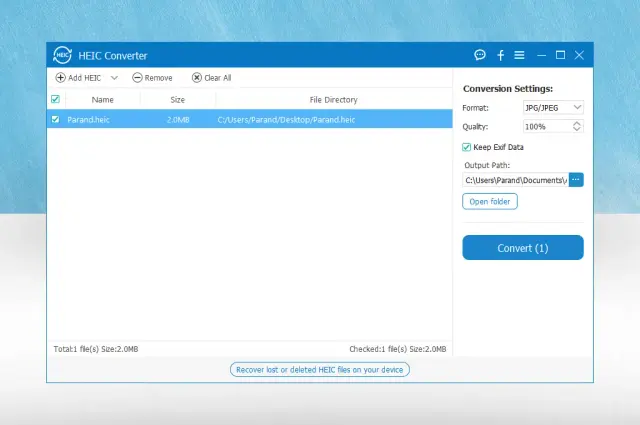
- Preserving image quality is our top priority. The software guarantees no noticeable loss of quality during conversion. Users can also adjust image quality settings before conversion, allowing them to control the size and resolution of the final file.
Whether you need optimal quality for professional retouching or compressed files for online sharing, Aiseesoft HEIC Converter for Mac offers flexible output options.
4. Preservation of EXIF Metadata
- Another major advantage is the ability to preserve EXIF data during conversion. EXIF metadata contains essential information such as the camera model, aperture, ISO sensitivity, location, and date the photo was taken.
For professional photographers and digital archivists, preserving metadata is crucial. Aiseesoft HEIC Converter for Mac 1.0.50 ensures that this information remains intact after conversion, thus preserving the integrity of your photo library.
5. Intuitive Interface
- Designed for ease of use, the software offers an intuitive interface that allows even beginners to convert HEIC files without any technical knowledge. The drag-and-drop functionality further enhances usability, making the process quick and easy.
In just a few minutes, users can import files, choose output settings, and complete the conversion effortlessly.
6. Secure Offline Processing
- Unlike online HEIC converters, Aiseesoft HEIC Converter for Mac operates offline. This ensures greater privacy and security, as images are not uploaded to external servers.
For users working with sensitive or personal photos, offline conversion offers peace of mind and optimal performance.
What’s New in Version 1.0.50
Aiseesoft HEIC Converter for Mac, version 1.0.50, includes several performance improvements and optimizations. While previous versions already offered reliable functionality, this latest version focuses on stability and efficiency.
Improved Conversion Speed
- Version 1.0.50 improves conversion speed, especially when processing large batches of HEIC files. This improvement is particularly beneficial for professionals who regularly manage large image collections.
Improved macOS Compatibility
- This update ensures better compatibility with recent macOS versions. Since Apple releases system updates frequently, software compatibility is essential. This version guarantees optimal performance on modern Mac systems.
Bug Fixes and Stability Improvements
- This latest version fixes minor bugs found in previous versions. Users will experience fewer interruptions, fewer crashes, and greater overall reliability.
Optimized Memory Usage
- Memory optimization is another key feature of version 1.0.50. The software now consumes fewer system resources, allowing for smooth operation even on older Mac devices.
You Can Also Download: goPanel 2.9.8 for Mac
System Requirements
- Operating System: macOS 10.7 or later
- Processor: 1 GHz Intel or faster (Apple Silicon compatible)
- RAM: 1 GB minimum (2 GB recommended)
- Storage: At least 200 MB of free disk space
- Internet: Not required for conversion
Advantages and Disadvantages
To provide a balanced review, let’s analyze the advantages and disadvantages of Aiseesoft HEIC Converter for Mac 1.0.50.
Advantages
- User-friendly interface, ideal for beginners and professionals
- Fast batch conversion
- High-quality results with adjustable settings
- Preserves EXIF metadata
- Secure offline conversion
- Lightweight and low resource consumption
- Compatible with modern macOS versions
Disadvantages
- Limited output formats (JPG and PNG only)
- No built-in image editing tools
- macOS only (no Windows version)
- Lacks advanced image customization options
Conclusion
Aiseesoft HEIC Converter for Mac 1.0.50 is a reliable and efficient solution for converting HEIC images to universally compatible formats, such as JPG and PNG. Thanks to its batch conversion capabilities, high-quality results, EXIF metadata retention, and secure offline processing, it meets the needs of both professionals and everyday users.
The latest version improves performance, optimizes macOS compatibility and memory usage, ensuring a smooth experience on modern Mac devices. While it lacks advanced editing features and only supports two output formats, its core functionality remains robust and reliable.
Leave a Reply