
A Better Finder Rename 12.23 for MacOS Download

A Better Finder Rename for Mac has earned a solid reputation among Mac users thanks to its reliability and advanced automation features. With over 20 years of development and continuous improvements, it remains one of the most dependable batch file renaming applications on the market. The latest version, 12.23, reinforces this reputation by incorporating performance improvements, enhanced compatibility, and new renaming actions tailored to modern workflows.
Efficiently managing your files is essential for optimal organization on macOS. Whether you’re a photographer, developer, content creator, or other professional, manually renaming large batches of files can be tedious and error-prone. This is where A Better Finder Rename for Mac 12.23 becomes an indispensable productivity tool. Designed specifically for macOS, it offers powerful and flexible file renaming capabilities that far surpass the native function of the Finder.
Better Finder Rename for Mac 12.23 offers precision, control, and speed. This comprehensive guide explores its key features, latest updates, system requirements, pros and cons, and explains why it stands out as the best batch file renaming software for macOS.
Key Features of A Better Finder Rename for Mac 12.23
1. Advanced Batch Renaming
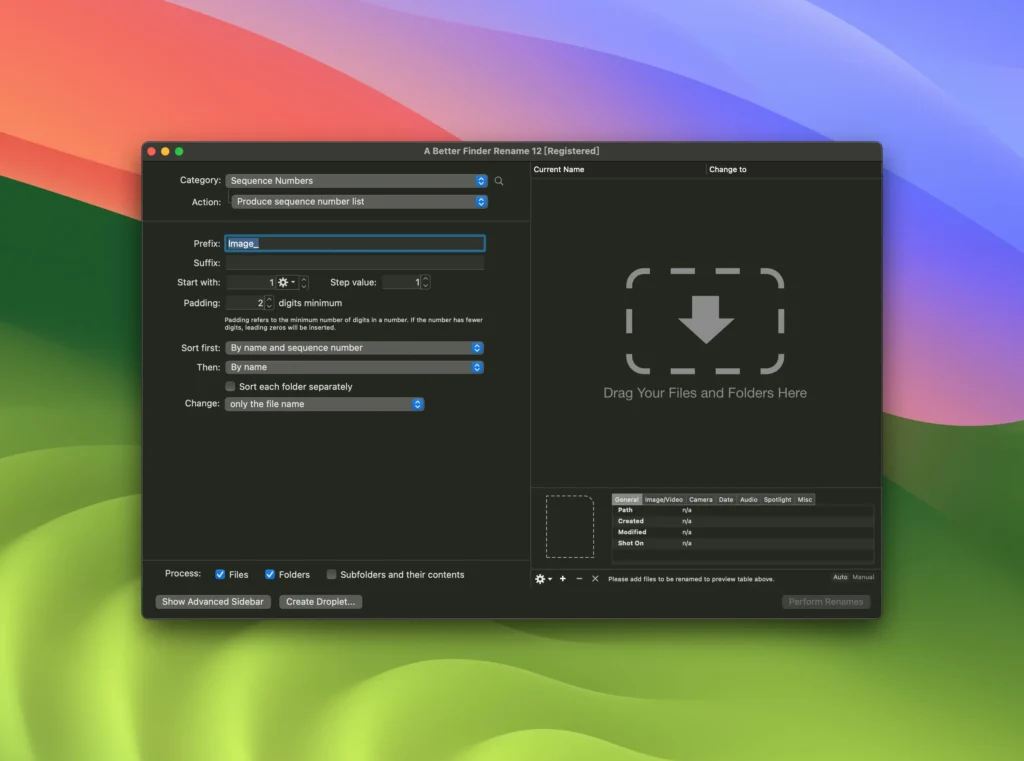
A Better Finder Rename specializes primarily in batch renaming. Unlike the built-in macOS renaming tool, it offers over 15 action categories and hundreds of configurable options. With structured rules and presets, users can rename thousands of files in seconds.
You can:
- Add, delete, or replace text
- Insert sequence numbers
- Change case (uppercase, lowercase, title case)
- Truncate filenames
- Add prefixes and suffixes
- Change file extensions
This flexibility makes it ideal for both casual users and professionals managing large volumes of data.
2. Powerful Metadata-Based and EXIF-Based Renaming
One of the standout features of A Better Finder Rename for Mac 12.23 is its metadata-based renaming capability. Photographers, in particular, benefit from renaming files using EXIF, IPTC, and XMP metadata.
You can rename your images based on the following criteria:
- Date and time of capture
- Camera model
- Lens information
- Geolocation data
- ISO settings
- Shutter speed
This feature is especially useful for organizing photos from DSLR or mirrorless cameras. Instead of generic filenames like IMG_1234.jpg, users can automatically generate descriptive names based on the details of the shot.
3. Rename Preview
One of the main advantages of A Better Finder Rename 12.23 is its real-time preview feature. Before applying changes, users can see exactly how each filename will look.
This reduces errors and ensures accuracy, especially when renaming hundreds or even thousands of files. The preview panel displays:
- Original filename
- New filename
- Highlighted differences
This gives users complete control over the renaming process.
4. Presets for Repetitive Tasks
If you regularly perform similar renaming tasks, the preset system will save you valuable time. You can create and save custom renaming configurations for later use.
For example:
- “Rename wedding photos”
- “Name monthly reports”
- “Export YouTube files”
This automation improves workflow efficiency and ensures consistent naming conventions across all projects.
5. Multi-Step Renaming
Unlike traditional renaming tools, A Better Finder Rename lets you perform multiple renames in a single batch process. You can combine rules such as:
- Remove specific text
- Add date formatting
- Apply numbering sequences
- Convert to lowercase
All in one operation. This modular approach simplifies and streamlines complex renaming workflows.
6. Renaming via Droplets
- A unique feature is the option to create droplets. Users can create standalone renaming droplets hosted on their desktop. Simply drag and drop files into the designated area. They will be automatically renamed according to predefined rules.
This feature is especially useful for repetitive production teams or environments.
7. Unicode and International Language Support
- A Better Finder Rename for Mac 12.23 is fully Unicode compatible, making it compatible with international character sets. This ensures seamless management of multilingual filenames and global workflows.
8. Seamless macOS Integration
- The software integrates seamlessly with the macOS Finder. It adheres to macOS design principles and supports drag and drop for an intuitive user experience.
What’s new in version 12.23?
Update 12.23 continues to optimize performance and compatibility, ensuring that A Better Finder Rename remains optimized for modern macOS environments.
Performance Improvements
- Version 12.23 introduces improved processing speed for large batches of files. Users working with thousands of files will notice smoother execution and faster renaming operations.
Improved macOS Compatibility
The latest version improves compatibility with recent macOS versions, ensuring stability on Apple Silicon and Intel-based Macs.
It is fully compatible with:
- Apple M-series processors
- Latest macOS file systems
- Updated security and privacy frameworks
Bug Fixes and Stability Improvements
- In addition to new features, version 12.23 includes minor bug fixes that improve overall reliability. Stability updates ensure consistent performance in professional environments.
You Can Also Download: SyncMate Expert for Mac
System Requirements
Before installing A Better Finder Rename for Mac 12.23, ensure your system meets the following requirements:
- Minimum System Requirements
- macOS 10.13 High Sierra or later
- Intel or Apple Silicon processor
- 4 GB of RAM minimum (8 GB recommended for large batch processing)
- Approximately 50 MB of available disk space
Advantages and Disadvantages
Advantages
- High-performance batch renaming engine
- Over 100 renaming actions
- Supports metadata and EXIF data
- Real-time preview to prevent errors
- Predefined and file group features
- Fast performance, even with large batches of files
- Excellent macOS integration
- Unicode support for international use
Disadvantages
- Paid software (no permanent free version)
- Advanced features may seem complex to beginners
- The interface prioritizes functionality over aesthetics
Conclusion
A Better Finder Rename for Mac 12.23 remains one of the most comprehensive and reliable batch renaming tools available for macOS. With its powerful automation features, metadata-based renaming, multi-step processing, and seamless integration with the Finder, it significantly improves productivity.
Furthermore, its real-time preview system ensures accuracy, while preset and grouping features simplify repetitive tasks. Whether you’re organizing thousands of photos or standardizing business documents, A Better Finder Rename 12.23 delivers professional-quality results.
Homepage:https://up4mac.org/
Leave a Reply