
Circular Studio 3.0 for MacOS Download
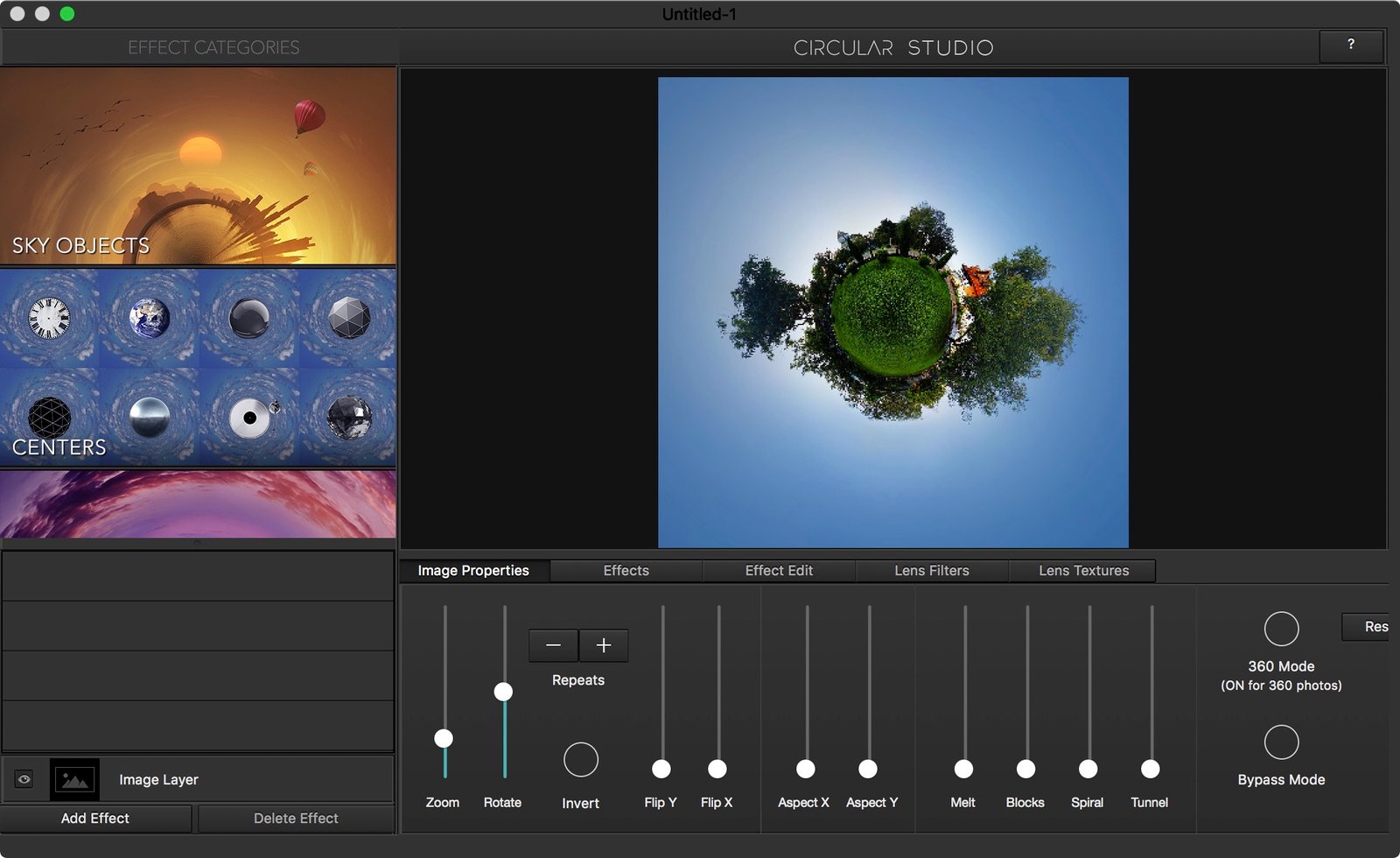
 Circular Studio 3.0 for Mac is a specialized photo editing application designed to help users create stunning circular images, radial effects, and original visual compositions. In today’s digital design landscape, circular and radial patterns are increasingly popular in photography, social media visuals, and digital art. Many designers and content creators are therefore looking for tools that simplify the creation of symmetrical and circular image effects. Circular Studio offers an intuitive solution for transforming ordinary images into captivating circular creations.
Furthermore, Circular Studio for macOS provides an intuitive editing environment that allows both beginners and professionals to create complex visual effects without requiring extensive design experience. Instead of manually creating circular patterns with complex graphics software, users can leverage Circular Studio’s built-in tools and templates. This significantly speeds up the editing process while maintaining professional quality.
Furthermore, the latest version, Circular Studio 3.0, offers improved performance, optimized editing tools, and enhanced compatibility with modern macOS systems. With digital design trends constantly evolving, creative professionals need flexible tools that allow them to experiment with new visual styles. Circular Studio remains a valuable resource for designers looking to easily create striking radial effects and circular image compositions.
Key Features of Circular Studio (3.0) for MacOS
Circular Image Transformation:
One of Circular Studio’s key features is its ability to convert standard images into circular creations. Simply select a photo and instantly apply circular cropping and transformation effects. This transforms ordinary photos into unique works of art.
Radial Symmetry Effects:
Circular Studio integrates powerful radial symmetry tools that allow you to repeat images around a central point. This enables users to create complex patterns and kaleidoscopic effects that add depth and creativity to their designs.
Adjustable Rotation Controls:
The software offers precise rotation controls that allow you to adjust the number of repetitions and the angle of each segment. Designers can experiment with different circular patterns until they achieve the desired visual effect.
High-Resolution Image Support:
Circular Studio supports high-resolution images, ensuring sharpness and precision in the final creations. This makes the software ideal for professional photography projects and large-format printing.
Real-Time Preview of Changes:
The real-time preview system is another important feature. When you change parameters such as rotation, mirroring, or cropping, the changes appear instantly. This makes the workflow more efficient and interactive.
Creative Pattern Generation:
The software allows you to generate complex geometric patterns from simple images. With this feature, designers can transform everyday photos into abstract works of art, ideal for digital illustrations or wallpapers.
Customizable Editing Controls:
Circular Studio offers numerous adjustment tools to fine-tune brightness, contrast, saturation, and color balance. This allows you to optimize images when applying circular effects.
User-Friendly Interface:
The application features a clear and intuitive interface that simplifies the editing process. Even beginners can quickly master the tools and create circular compositions without extensive training.
Multi-Format Export Options:
Circular Studio allows you to export your final creations in a variety of image formats. The generated images can then be easily used on websites, in digital projects, or in print materials.
What’s New in Circular Studio 3.0 For Mac?
The Circular Studio 3.0 update includes several improvements that optimize functionality and performance.
First, this new version incorporates an improved rendering engine. Thanks to this improvement, circular patterns and radial effects are generated faster and more accurately. This allows users to create complex designs without slowdowns.
In addition, the developers have improved the editing controls, allowing for more precise adjustments to the symmetry, rotation, and density of patterns. This gives designers greater creative freedom when creating circular artwork.
Another important improvement is compatibility with recent macOS versions. This update ensures optimal software performance on the latest Macs, including those equipped with Apple Silicon processors. Therefore, users will benefit from increased speed and stability.
Furthermore, Circular Studio 3.0 includes several user interface improvements that make the workflow more intuitive. Navigation between tools has been simplified, and commands are now more accessible. Users, both beginners and experienced, can complete their projects more efficiently.
Finally, this update includes bug fixes and stability improvements. Thanks to these enhancements, the software now offers a more reliable editing experience for creative professionals.
You may also Download: CleanMyMac 5.3.1 for MacOS
System Requirements:
Before installing Circular Studio for macOS 3.0, ensure your system meets the following requirements.
Minimum System Requirements:
- Operating System: macOS 11 Big Sur or later.
- Processor: Intel or Apple Silicon Mac processor.
- RAM: 4 GB minimum.
- Disk Space: 200 MB available.
- Graphics Card: macOS-compatible graphics hardware.
Recommended System Requirements:
- Operating System: macOS 12 Monterey or later.
- Processor: Apple Silicon (M1, M2, or later) or Intel Core i5 or better.
- RAM: 8 GB minimum.
- Disk Space: 500 MB available.
- Display: Retina or high-resolution display recommended.
Meeting the recommended specifications ensures faster rendering and smoother editing.
Advantages and Disadvantages:
Advantages:
- Specialized tool for creating circular images.
- Intuitive interface, ideal for beginners.
- Compatible with high-resolution image editing.
- Real-time preview for an efficient workflow.
- Enables the creation of original radial symmetry effects.
- Optimized performance for macOS.
- Ideal for digital art and creative photography.
Disadvantages:
- Primarily focused on circular and radial effects.
- Limited advanced photo editing features compared to full-fledged graphic design software.
- Mastering some complex patterns may require several attempts.
Conclusion:
Circular Studio for Mac is a creative image editing application that allows you to transform ordinary photos into visually striking circular and radial pattern creations. With current design trends often incorporating symmetrical and geometric elements, this software offers an efficient solution for generating such effects without complex processes.
Homepage: https://up4mac.org/
Leave a Reply