
CirMenu 2.7.0 for MacOS Download [Latest 2026]

CirMenu is a macOS utility that revolutionizes how you interact with your Mac. It replaces traditional menus and complex keyboard shortcuts with a customizable radial menu, accessible from anywhere on the screen. With CirMenu, you can launch applications, open files, navigate URLs, paste text, or use keyboard shortcuts without having to memorize complex combinations.
It’s especially useful for users who want to optimize their workflow, reduce cursor movement, and make frequent actions more intuitive, whether you’re a creative professional, a power user, or simply someone who wants to simplify repetitive tasks.
CirMenu is a modern productivity tool that revolutionizes how you interact with your Mac. Instead of relying solely on traditional menus, keyboard shortcuts, or complex workflows, CirMenu offers a radial (circular) menu accessible from anywhere on the screen.
With CirMenu, you can instantly launch applications, open files or folders, use keyboard shortcuts, paste frequently used text, or run AppleScripts. Its visual interface, optimized for both mouse and trackpad, is designed to reduce cognitive load, streamline repetitive tasks, and make your workflow more intuitive. Users who run multiple applications or perform repetitive actions will see a significant improvement in their efficiency once the menus are properly configured.
Key Features of CirMenu:
Customizable Radial Menus
- Create circular (slice-shaped) menus that appear anywhere on the screen.
- Each menu can have multiple sections for different actions.
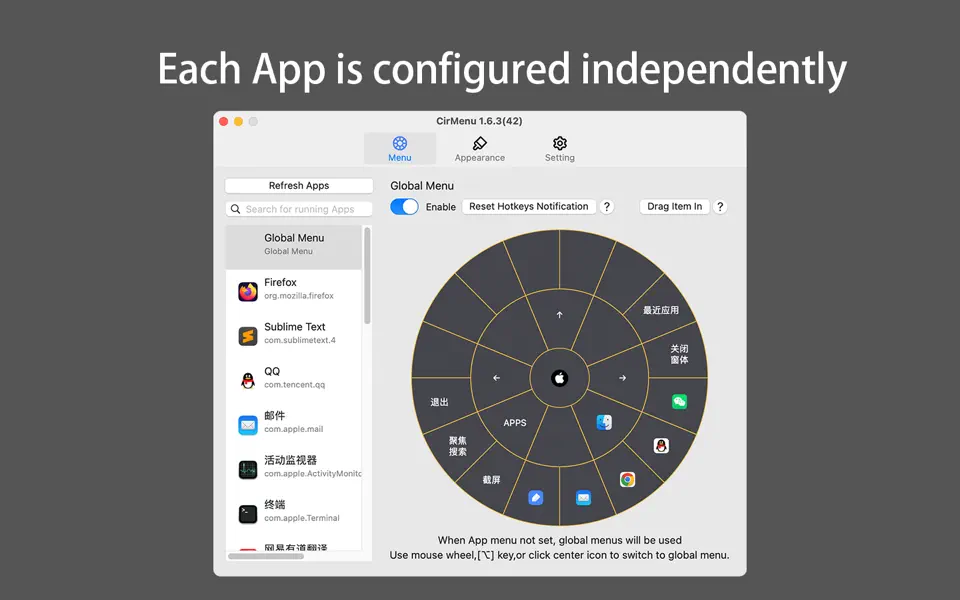
Application-Specific Menus
- Create unique menus for each application.
- Example: a Photoshop menu with layers and brush controls, a Safari menu with bookmarks and tabs.
Multiple Action Types
- Launch applications or files.
- Open folders or URLs.
- Paste predefined text snippets.
- Trigger macOS shortcuts or custom keyboard commands.
- Run AppleScript or macOS shortcuts.
Flexible Triggers
- Open the menu with a keyboard shortcut, a mouse click, or a trackpad gesture.
- Customize triggers per menu or globally.
Mouse and Trackpad Support
- Works seamlessly with gestures and clicks.
- Fluid and responsive interface for both input methods.
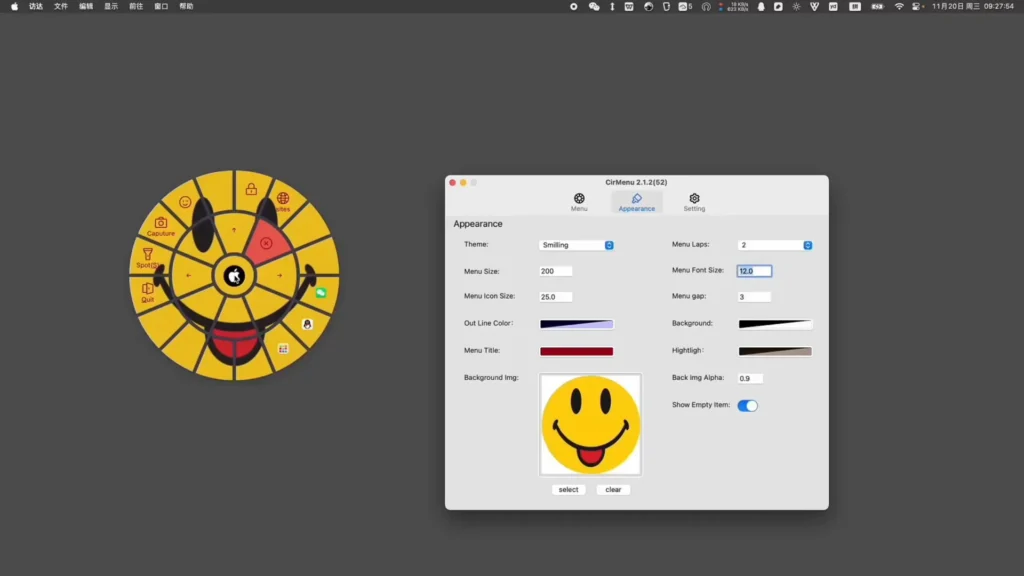
Visual Customization
- Assign icons, colors, and labels to each menu item.
- Organize items for quick access and intuitive navigation.
Lightweight and Powerful
- Minimal impact on system resources.
- Runs silently in the background, maintaining speed and responsiveness.
Workflow Optimization
- Reduce cognitive load by centralizing the most frequent actions.
- Streamline and make repetitive tasks more intuitive.
What’s New in CirMenu?
CirMenu continues to evolve with updates that improve performance, stability, and customization options for macOS users. Here’s a summary of the latest changes:
Latest Version Improvements
Version 2.7.1
Bug fixes and system performance optimization for smoother, more reliable daily use.
Version 2.7.0
- Improved performance and stability for a more polished user experience.
- Improved compatibility with the latest macOS versions, ensuring smooth operation on newer systems.
- Enhanced user interface for a more responsive look and feel.
Past Highlights
- Shortcut invocation support: You can now activate macOS shortcuts directly from CirMenu’s radial menus.
- Interaction improvements: Previous updates added smoother animations, faster response times, and more intuitive menu behavior.
System Requirements:
To run CirMenu on Mac, your system should meet the following:
- OS: macOS 12 or later (compatible with the latest versions)
- Processor: Intel or Apple Silicon (M1/M2)
- RAM: Minimum 4 GB recommended
- Storage: 50 MB free disk space
- Other: Mouse or trackpad for menu interaction
Pros and Cons
Pros:
- Intuitive radial menu interface that streamlines workflow
- Highly customizable and application-specific menus
- Works with mouse, trackpad, and keyboard
- Lightweight, with minimal impact on system resources
- Supports scripts, shortcuts, and text snippets
Cons:
- Initial setup may take some time to optimize menus
- Documentation is limited and may require trial and error
- Some minor bugs have been reported with certain macOS versions or in-app purchases
How to Install?
- Download CirMenu: Get the latest version from the Mac App Store.
- Install the application: Drag it to your Applications folder if necessary.
- Launch and configure: Open CirMenu from your Applications folder or the menu bar.
- Configure triggers: Assign keyboard shortcuts, mouse gestures, or trackpad actions to open your radial menu.
- Create menus: Add sections for applications, files, shortcuts, or scripts.
- Customize the appearance: Assign icons, labels, and colors for easier navigation.
- Get started: Activate your menu anywhere and enjoy faster workflows.
Final Thought?
CirMenu is a powerful and elegant utility for Mac users who want to simplify repetitive tasks, reduce their reliance on keyboard shortcuts, and enjoy a visual and intuitive interaction with their Mac. Thanks to its regular updates, application-specific menus, and numerous customization options, it’s a tool that will save you time and energy every day.
Homepage:https://up4mac.org/
Leave a Reply