
Clever Data Recovery 6.1 MAS Multilingual MacOS

Clever Data Recovery for Mac is professional data recovery software designed specifically for macOS users. It allows you to recover lost, deleted, or formatted files from internal and external hard drives, USB flash drives, SD cards, and other storage media. The software supports a wide range of file types, including documents, photos, videos, audio files, emails, and system files.
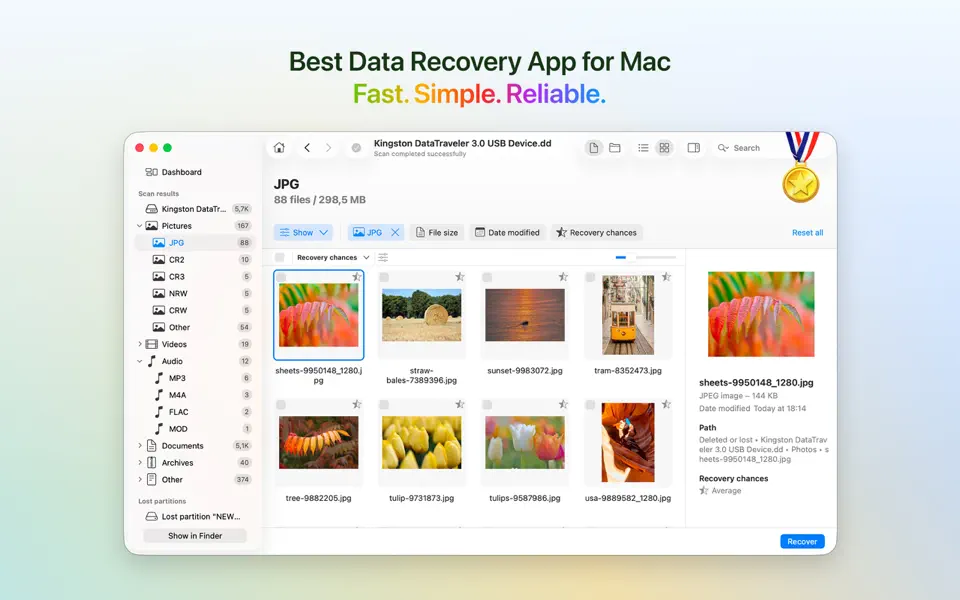
Clever Data Recovery helps you recover deleted files from your Mac (photos, videos, documents, and more) from internal and external hard drives, USB flash drives, and SD cards. Version 6 offers a new, streamlined user interface that helps you easily browse, preview, sort, and filter your recoverable data.
The free Disk Drill application can scan and recover lost data and entire partitions from virtually any storage device, including Macintosh internal hard drives, external disks, SSDs, cameras, iPhones, iPads, iPods, Android devices, USB flash drives, Kindles, memory cards, Windows and Linux RAID arrays, virtual hard drives, and disk images.
Clever Data Recovery can recover your deleted photos, images, music, documents, applications, videos, notes, and other data. The software features several data recovery algorithms that run in an intelligent sequence. “Quick Scan” and “Search for Lost Partitions” can recover files of any format. “Deep Analysis” works at a lower level and analyzes disks as binary entities. It performs hard drive recovery based on file signatures, so original file names, locations, and properties cannot always be recovered.
Key Features of Clever Data Recovery:
Why Clever Data Recovery stands out among Mac data recovery tools:
1. Comprehensive File Support:
The software supports the recovery of over 500 file types, including:
- Documents: PDF, Word, Excel, PowerPoint
- Images: JPG, PNG, TIFF, RAW
- Audio and Video: MP3, WAV, MP4, MOV
- System Files: ZIP, RAR, DMG
2. Multiple Recovery Scenarios:
Clever Data Recovery can handle various data loss scenarios, such as:
- Accidental deletion (Shift + Delete or emptying the Trash)
- Drive formatting or corruption
- macOS system crash
- Virus attacks
- Partition loss or damage
3. Safe and Non-Destructive Recovery:
The software does not modify your original data during recovery, ensuring its safety and integrity. It simply scans the drive and restores the files to your chosen location.
4. Deep and Fast Scans:
- Quick Scan: Searches for recently deleted files and recovers them quickly.
- Deep Scan: Thoroughly scans storage media to recover files lost due to formatting, corruption, or system crashes.
5. Preview Before Recovery:
Clever Data Recovery lets you preview files before restoring them. This saves you time and ensures you recover exactly what you need.
6. External Device Compatibility:
It’s not limited to your Mac’s internal storage. You can recover data from:
- External hard drives and SSDs
- USB flash drives
- SD and microSD cards
- Digital cameras and other portable devices
What’s New in Clever Data Recovery for Mac:
Clever Data Recovery for Mac continues to evolve with powerful enhancements that deliver faster scans, greater compatibility, and improved recovery results, especially in complex data loss scenarios. Here are the latest updates.
Significant Performance Improvements:
- Faster scan speeds allow users to locate lost files more quickly, even on large or heavily used drives.
- Optimized algorithms improve detection accuracy for both recently deleted and long-lost dataAdvanced Video and Multimedia Recovery
- A new advanced camera recovery module can reconstruct fragmented video files.
- Designed for recordings from action cameras, drones, DSLRs, and mirrorless cameras.
- Especially useful for recovering videos that were previously unplayable or incomplete.
Expanded Drive and File System Compatibility:
- Recovery from encrypted drives, including BitLocker-protected storage, is now supported.
- Improved support for Windows-formatted drives accessed from macOS.
- Better handling of damaged, corrupted, or partially readable partitions.
More Supported File Types:
Support for new and specialized file formats, including:
- Professional design and layout files
- Advanced file and compression formats
- Software files for productivity and outlining
- This increases the chances of recovering niche-specific data.
New Advanced Tools for Power Users:
- The hex view allows for low-level inspection of disk data.
- Useful for forensics, IT professionals, and advanced troubleshooting.
Enhanced macOS Compatibility:
- Fully optimized for the latest macOS versions.
- Ensures stable performance on both Intel-based Macs and Apple Silicon (M series) Macs.
Improved Backup and Security Features:
- Enhanced reliability of byte-by-byte backups for unstable or failing drives.
- Ensures safer recovery by allowing users to work from disk images instead of the original hardware.
You may also Download:
Ghost Buster Pro 4.1.2 for MacOS
System Requirements for Clever Data Recovery:
- Operating System: macOS 10.15 (Catalina) or later
- Processor: 64-bit Intel or Apple Silicon (M-series)
- Memory: 4 GB RAM or more recommended
- Storage: At least 1 GB free disk space for installation
- Permissions: Full Disk Access required for deep scans and internal drive recovery
Pros and Cons:
Pros:
- User-friendly interface
- Supports a wide range of file types
- Safe, non-destructive recovery
- Works with external and internal storage
Cons:
- Deep Scan can be time-consuming on large drives
- Free versions may have file recovery limits
How to Download?
- Download the Clever Data Recovery installer for macOS.
- Open the downloaded file and drag the app into the Applications folder.
- Launch the application from Applications or Spotlight.
- Grant the required permissions when prompted, including Full Disk Access, for complete recovery functionality.
- Restart the app if requested to apply permission changes.
Homepage:https://up4mac.org/
Leave a Reply