
FSNotes 7.0.0 for MacOS Download [Latest 2026]

FSNotes 7.0.0 is designed for users who value organization, flexibility, and performance. Unlike traditional note-taking apps that rely heavily on proprietary formats, FSNotes stores notes as plain text files, making them future-proof, easy to sync, and accessible across different platforms. With version 7.0.0, FSNotes continues to refine its strengths while introducing significant improvements that optimize usability and performance.
In today’s fast-paced digital world, having a reliable and efficient note-taking application is essential for students, professionals, developers, and everyday users alike. macOS users, in particular, often look for fast, lightweight applications that are fully integrated with the Apple ecosystem. FSNotes 7.0.0 for Mac is one such application that has gained popularity for its simplicity, speed, and focus on managing plain text and Markdown-based notes.
Key Features of FSNotes 7.0.0 for Mac
FSNotes is known for its clean interface and powerful features. Below are the most important features that make FSNotes a favorite among macOS users.
Fast and Lightweight Performance
- One of FSNotes’ biggest advantages is its speed. The application is optimized for peak performance, allowing users to instantly create, search, and edit notes, even when working with large collections. Because FSNotes uses local files instead of a complex database, it launches quickly and consumes minimal system resources.
Markdown and Plain Text Support
- FSNotes is designed with Markdown, making it ideal for writers, developers, and technical users. You can format text with simple syntax, preview Markdown in real time, and export notes in various formats. Furthermore, plain text storage ensures compatibility with other editors and long-term accessibility.
Folder-Based Organization
- FSNotes organizes notes using folders on your Mac. This structure mirrors the Finder, making file management intuitive. Users can create nested folders, move notes freely, and maintain complete control over their data without relying on hidden databases.
Advanced Search and Tagging
- Searching in FSNotes is fast and accurate. The app supports full-text search, filtering by tags, and keyword highlighting. Tags can be added directly to notes, allowing users to efficiently categorize and retrieve information.
iCloud Compatibility and External Syncing
- FSNotes integrates seamlessly with iCloud Drive, enabling automatic syncing across multiple Apple devices. It also supports other cloud services like Dropbox and Git-based workflows, making it ideal for users who prefer flexible syncing options.
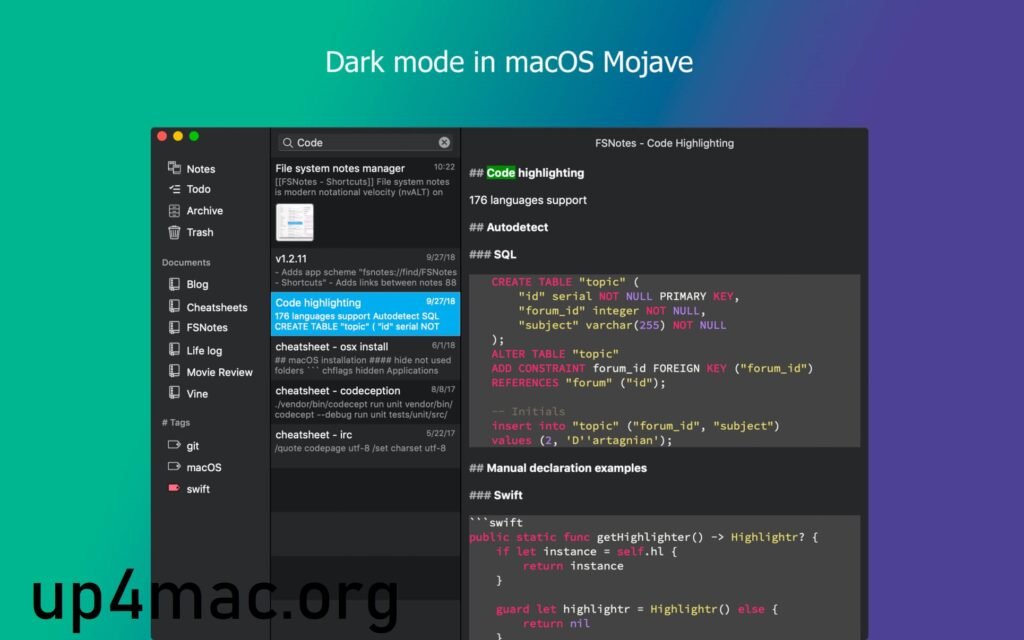
Code and Syntax Highlighting
- For developers and technical users, FSNotes includes syntax highlighting for several programming languages. This feature is especially useful for storing code snippets, technical documentation, or configuration files.
Keyboard Shortcuts and Productivity Tools
- FSNotes offers extensive keyboard shortcut support, allowing advanced users to navigate, edit, and organize notes without using the mouse. This significantly improves productivity, especially for users who manage a large volume of notes daily.
What’s New in FSNotes 7.0.0?
The FSNotes 7.0.0 update focuses on stability, performance, and user experience. While FSNotes maintains a consistent design philosophy, each major release incorporates improvements that enhance everyday usability.
Improved Performance and Stability
- Version 7.0.0 introduces optimizations that improve performance when working with large note libraries. Search operations are faster, indexing is more efficient, and overall responsiveness has been improved, ensuring a smoother experience.
Improved Markdown Rendering
- Markdown preview and rendering have been refined in this release. Users can expect more accurate formatting, better handling of complex Markdown elements, and greater consistency between editing and preview modes.
UI and Usability Improvements
- FSNotes 7.0.0 includes subtle interface improvements that make navigation more intuitive. These improvements help reduce distractions and maintain the app’s clean, minimalist design, while also enhancing accessibility.
Improved macOS Compatibility
- The latest version ensures better compatibility with newer macOS versions. System-level integrations, file management, and iCloud synchronization have been improved to meet the latest Apple standards.
Bug Fixes and Minor Improvements
- As with any major update, FSNotes 7.0.0 addresses previously reported issues and bugs. These fixes contribute to a more stable and reliable note-taking environment for long-term use.
System Requirements
- Operating System: Latest version of macOS
- Processor: Apple Silicon or modern Intel processor
- RAM: 8 GB or more
- Storage: SSD with sufficient free space for notes and backups
- Internet Connection: Stable connection for cloud syncing
Advantages and Disadvantages of FSNotes 7.0.0 for Mac
Like any software, FSNotes has its pros and cons. Understanding both helps users make an informed decision.
Advantages
- Fast and lightweight performance
- Plain text and Markdown-based storage
- Excellent search and tagging system
- Smooth iCloud and external syncing support
- Ideal for developers, writers, and power users
- Clean and distraction-free interface
- Effective keyboard shortcut support
Disadvantages
- Limited rich text formatting compared to traditional note-taking apps
- Not designed for users who prefer extensive visual customization
- Some advanced features may require a learning curve for beginners
Conclusion
FSNotes 7.0.0 for Mac is a powerful, efficient, and well-designed note-taking application that prioritizes speed, simplicity, and user control. Its focus on plain text and Markdown makes it especially appealing to developers, writers, and professionals who value flexibility and long-term data accessibility.
Leave a Reply