
iNet Network Scanner 3.2.2 for MacOS Download [Latest 2026]

iNet Network Scanner for Mac is a professional network analysis tool designed primarily for macOS and iOS users. It allows you to identify all devices connected to a local network, monitor network activity, and detect potential security risks. With its intuitive interface and advanced analysis features, iNet Network Scanner provides detailed information without requiring extensive technical knowledge.
Furthermore, iNet Network Scanner is widely used to troubleshoot network problems, locate unauthorized devices, and discover services across various protocols. Thanks to continuous updates and performance improvements, version 3.2.2 enhances the stability and accuracy of its analysis, making it one of the most reliable network analysis tools on the market.
Key Features of iNet Network Scanner:
Network Device Detection
One of the main advantages of iNet Network Scanner is its real-time device detection. It scans your local network and displays all connected devices, including:
- Computers and laptops
- Smartphones and tablets
- Routers and switches
- Smart TVs and connected devices
- Printers and network storage devices
Each device is displayed with detailed information, such as the IP address, MAC address, manufacturer name, and hostname. This allows users to quickly identify unknown devices and take appropriate action.
Service and Port Scanning
Another important feature is port and service scanning. iNet Network Scanner can detect open ports and running services on each device. This is particularly useful for:
- Identifying vulnerable services
- Checking firewall settings
- Checking server availability
In addition, users can analyze services such as HTTP, FTP, SSH, SMB, etc., which helps diagnose network performance issues.
Ping and Latency Tests
iNet Network Scanner includes advanced ping tools that measure response times and packet loss. This feature is essential for:
- Diagnosing slow connections
- Testing network stability
- Monitoring latency between devices
Thus, users can easily identify bottlenecks in their network.
Wake-on-LAN Support
With Wake-on-LAN (WoL) support, users can remotely wake up devices compatible with this protocol. This is especially useful for administrators who need to manage multiple systems without physical access.
Bonjour and Service Discovery
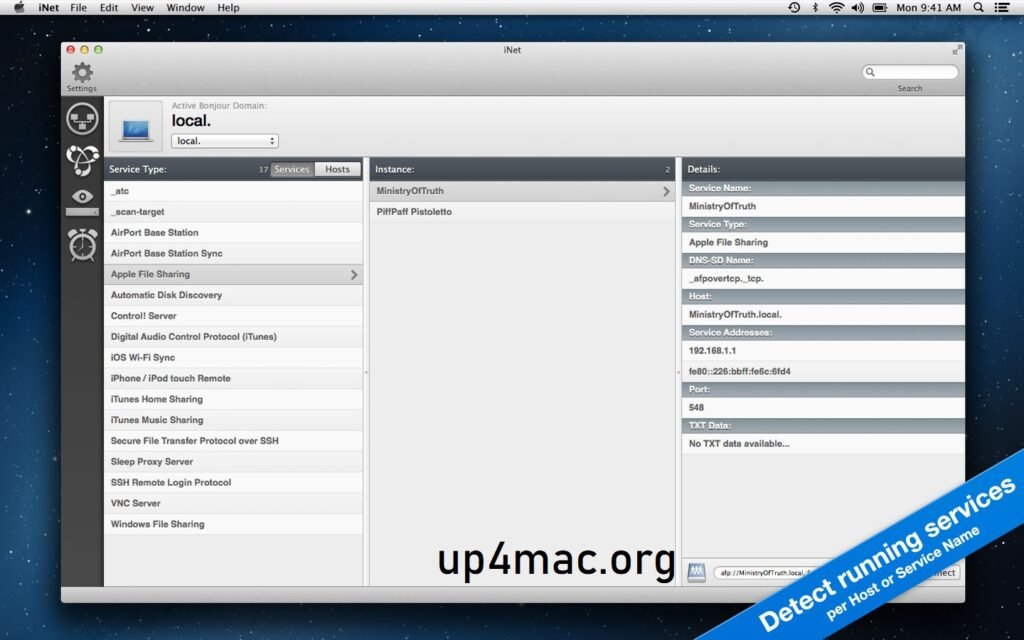
iNet Network Scanner for Mac also supports Bonjour (ZeroConf), enabling automatic discovery of services such as printers, file servers, and media devices. This simplifies network management and reduces manual configuration.
Custom Device Profiles
Users can create custom labels and profiles for known devices. This simplifies the organization and interpretation of subsequent scans, especially in large or complex networks.
What’s New in iNet Network Scanner 3.2.2?
Version 3.2.2 focuses on performance improvements, compatibility enhancements, and bug fixes. While not a full update, it significantly improves the user experience.
- Improved scan speed for large networks
- Greater accuracy in device identification
- Improved compatibility with recent macOS versions
- Optimized memory usage
- Minor UI improvements for better readability
- Improved stability during continuous scans
You Can Also Download: Wondershare PDFelement Pro
System Requirements:
- Operating System: macOS (latest version)
- Processor: Apple M1/M2 or recent Intel processor
- RAM: 4 GB minimum
- Disk Space: 300 MB free space
- Network: Broadband internet connection for optimal analysis performance
Advantages and Disadvantages
Advantages
- User-friendly interface ideal for beginners
- Fast and accurate network analysis
- Detailed device information
- Supports multiple analysis methods
- Wake-on-LAN functionality
- Regular updates and active development
- Suitable for personal and professional use
Disadvantages
- Advanced features may require technical knowledge
- Paid version required to access all features
- Primarily optimized for macOS and iOS
- Limited automation compared to enterprise tools
Conclusion:
iNet Network Scanner for Mac is a powerful and versatile tool for those who want to understand, monitor, and protect their network. With features such as device discovery, service analysis, latency testing, and Wake-on-LAN support, it offers complete network visibility through an intuitive interface.
Homepage:https://inetapp.de/
Leave a Reply