
Kaleidoscope 6.4.1 for MacOS Download [Latest 2026]
Kaleidoscope for Mac is a professional file comparison and merging utility designed to facilitate the visual comparison of text files, folders, images, and even code repositories. With its clear interface and powerful engine, Kaleidoscope simplifies the detection of differences, the resolution of conflicts, and the maintenance of consistency between projects.
Furthermore, Kaleidoscope is known for its seamless integration with popular version control systems such as Git, Subversion, and Mercurial. This has made it an indispensable tool for developers who require precise file comparison and merging capabilities on a daily basis.
Key Features of Kaleidoscope:
Kaleidoscope for Mac offers a comprehensive set of features that go far beyond simply comparing files. Here are the key advantages that make it one of the best comparison tools for macOS:
1. Advanced Text Comparison
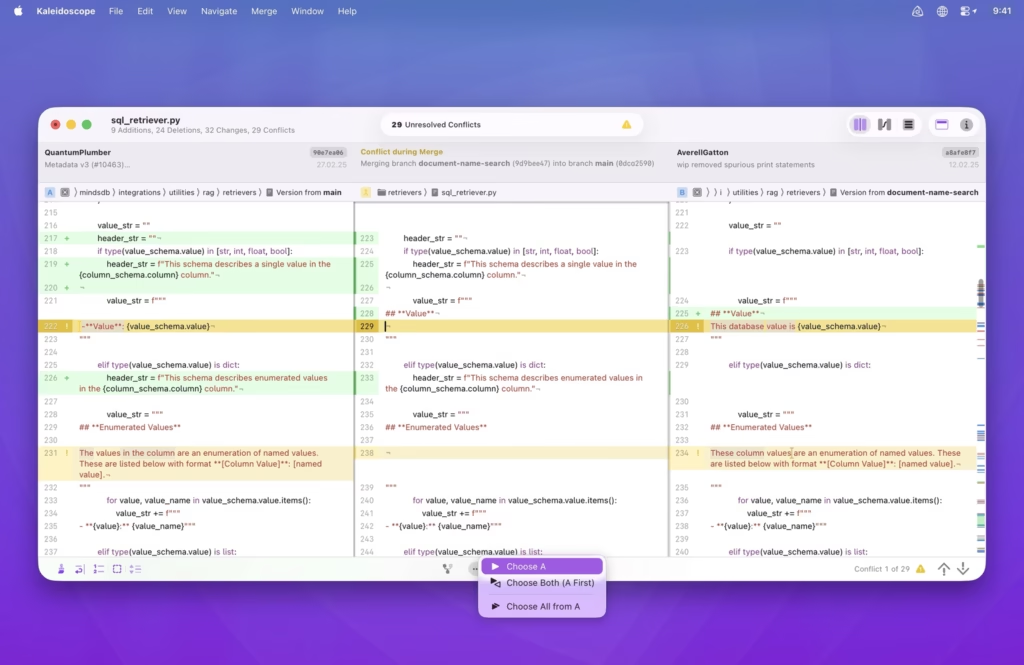
One of Kaleidoscope’s main strengths is its text comparison engine. It allows for exceptionally accurate comparisons of plain text, source code, configuration files, and scripts. Side-by-side visualization clearly highlights additions, deletions, and modifications using color coding.
Furthermore, syntax highlighting is supported by many programming languages, making it easier for developers to analyze code changes.
2. Folder and Directory Comparison
Kaleidoscope can compare entire folders and directories, not just individual files. This feature is especially useful for:
- Identifying missing or duplicate files
- Detecting renamed or modified documents
- Synchronizing project directories
3. Image Comparison
Unlike many other comparison tools, Kaleidoscope allows for visual image comparison. It detects differences between two images at the pixel level, making it extremely useful for designers, UI developers, and photographers.
This feature allows users to:
- Overlay images for visual inspection
- Highlight pixel differences
- Zoom in and pan within the image for detailed analysis
4. Three-Way Merging
Kaleidoscope integrates powerful three-way merging features, essential for resolving conflicts in version control systems. Compare:
- The original file
- The current version
- The modified version
This ensures accurate conflict resolution and reduces the risk of losing important changes.
5. Integration with Version Control Systems
Kaleidoscope integrates seamlessly with leading version control tools, including:
- Git
- Subversion (SVN)
- Mercurial
This allows developers to run comparisons directly from their repositories, improving workflow efficiency.
6. Customizable Interface
Kaleidoscope allows users to customize its interface to optimize their productivity. You can adjust fonts, colors, layout, and comparison rules to suit your preferences. This flexibility makes the tool accessible to both beginners and advanced users.
7. High Performance and Speed
Even when managing large files or complex directories, Kaleidoscope maintains high performance. Its optimized engine ensures fast load times and smooth navigation, essential in a professional environment.
What’s New in Kaleidoscope 6.4.1?
Update 6.4.1 focuses on improving performance, stability, and compatibility with the latest macOS versions. While a minor update, it includes several significant enhancements that optimize the user experience.
Improved macOS Compatibility
Kaleidoscope for Mac is fully optimized for the latest macOS versions. This ensures greater stability and reduces crashes, especially on the latest Apple Silicon devices.
Bug Fixes and Stability Improvements
This update fixes several minor bugs reported in previous versions. These fixes result in:
- Smoother application launches
- More reliable folder comparisons
- A difference in crashes when analyzing large files
Optimized Performance
Performance has been optimized for more efficient handling of large projects. This includes faster difference calculations and reduced memory consumption when handling complex directories.
Improved version control integration
Kaleidoscope 6.4.1 enhances its integration with Git and other version control systems, ensuring accurate conflict detection and faster merge operations.
You Can Also Download: Topaz Gigapixel for MacOS
System Requirements:
- Operating System: macOS (latest version)
- Processor: Apple Silicon or recent Intel processor
- RAM: Minimum 8 GB
- Storage: SSD with at least 500 MB of free space
- Display: Retina or high-resolution
Advantages and Disadvantages
Advantages
- Powerful comparison of text, files, and images
- Excellent triple merge functionality
- Smooth integration with Git and other version control systems
- Clear and intuitive user interface
- High performance and stability
Disadvantages
- Higher price than basic comparison tools
- Limited features in the free trial version
- Not compatible with Windows or Linux
Conclusion:
In conclusion, Kaleidoscope for Mac is a professional comparison and merging tool that offers exceptional performance, accuracy, and ease of use. Its ability to handle text, folders, and images makes it a versatile solution for developers, designers, and technical professionals.
Homepage:https://kaleidoscope.app/
Leave a Reply