
LensFlare Studio 2 v1.0 For Mac Download
 LensFlare Studio 2 For MacOS is a powerful visual effects tool designed for photographers, video editors, and digital artists who want to add realistic lens flares to their projects. In modern visual production, lighting effects play a crucial role in enhancing the overall look and cinematic quality of images and videos. That’s why professionals often turn to specialized software that simulates the natural flares produced by camera lenses. LensFlare Studio 2 offers an advanced environment that allows users to design and apply custom flare effects with impressive realism and precision.
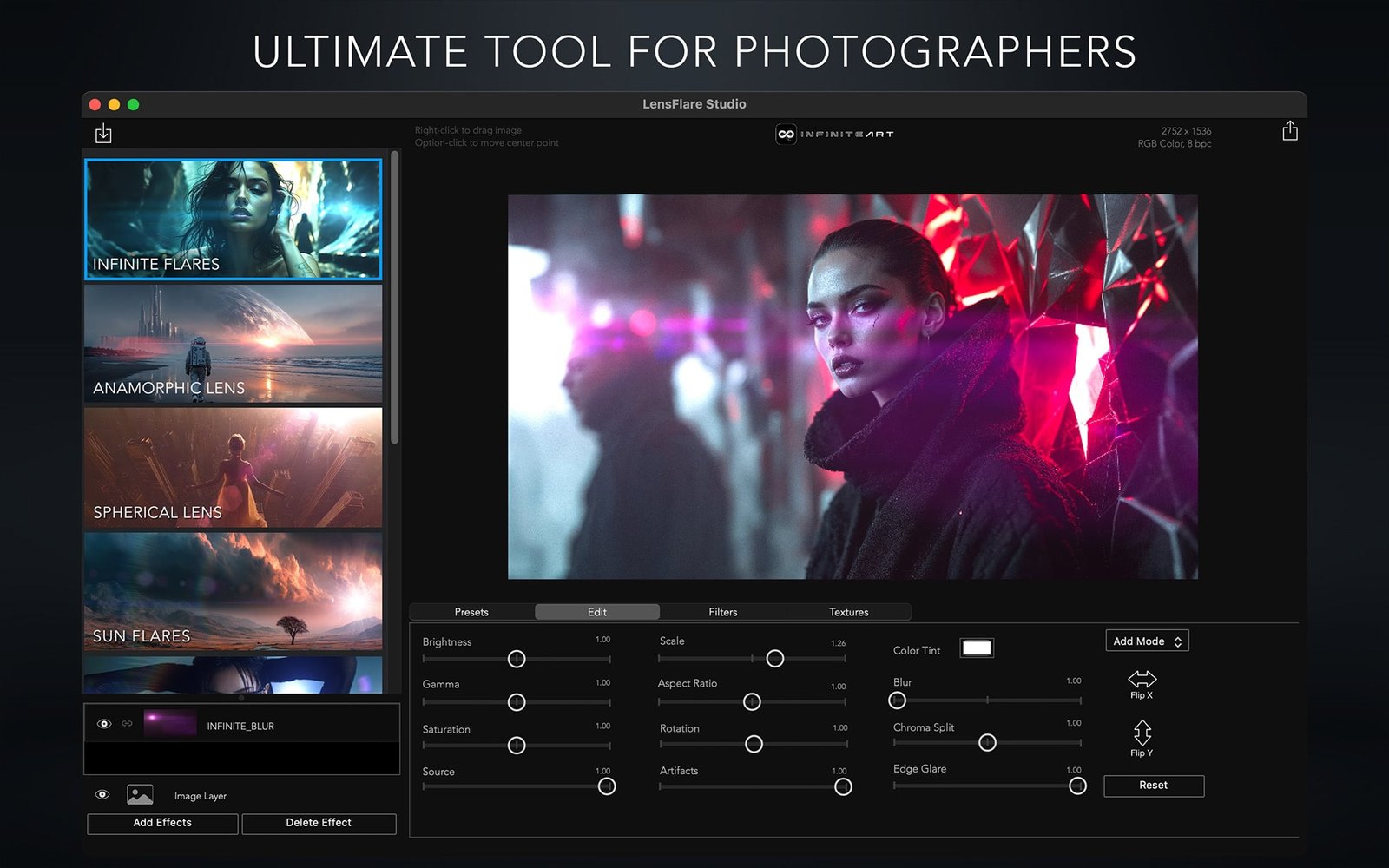
Furthermore, LensFlare Studio 2 for macOS features an intuitive interface combined with powerful creative tools. Instead of manually creating lighting effects in complex editing software, users can quickly generate professional flares with adjustable parameters, thus accelerating and streamlining their creative workflow.
Finally, LensFlare Studio 2 v1.0 offers improved rendering performance, refined flare elements, and enhanced compatibility with modern macOS systems. With the constant evolution of visual storytelling, high-quality lighting effects have become essential for creating compelling multimedia content. LensFlare Studio 2 provides a comprehensive suite of tools that allow users to enhance their visuals while maintaining complete control over the creative process.
Key Features of LensFlare Studio 2 v1.0 for MacOS:
Advanced Flare Effect Creation Tools:
One of the most striking features of LensFlare Studio 2 is its advanced flare effect creation system. Users can generate complex flare effects by combining multiple optical elements such as sparkles, rings, trails, and reflections. This allows artists to create strikingly realistic lighting effects that mimic camera lenses.
Extensive Flare Effect Preset Library:
The software includes a vast collection of built-in flare effect presets that can be applied instantly. For example, users can choose from cinematic flare effects, sci-fi lighting effects, and natural light reflections. This means even beginners can achieve professional results without starting from scratch.
Real-Time Rendering:
LensFlare Studio 2 offers a real-time preview system that allows users to instantly see changes to flare effect properties. This lets artists experiment with different settings and immediately see how the effects will look in their final composition.
Customizable Optical Elements:
Another major advantage is the ability to customize each component of the flare. It’s possible to adjust the brightness, color, size, position, and transparency of each element. The final effect can therefore be perfectly tailored to the project’s lighting.
High-resolution support:
The application supports high resolutions, including 4K and higher resolutions. This makes it ideal for professional photography, cinematic video production, and high-quality digital art creation.
Layer-based editing system:
LensFlare Studio 2 uses a layer-based structure that allows you to easily stack and organize flare components. This enables you to manage complex lighting compositions in an organized and flexible way.
Video and motion graphics compatibility:
In addition to still images, LensFlare Studio 2 can be used in video and motion graphics workflows. This feature allows filmmakers and video editors to create dynamic flare animations that move naturally within scenes.
Color Control and Adjustment Tools:
The software offers comprehensive color calibration tools for flare elements. Users can adjust the hue, saturation, and brightness to match their project’s color palette, ensuring flares blend seamlessly into the visual environment.
What’s New in LensFlare Studio 2 for Mac?
LensFlare Studio 2 version 1.0 includes several significant improvements that greatly enhance the user experience.
First, the software features a completely redesigned rendering engine. Thanks to this improvement, flare effects are generated faster while maintaining high visual accuracy. This allows users to work more efficiently, even with complex flare compositions.
In addition, this new version offers an expanded collection of flare presets. These presets include cinematic lighting styles, dramatic sun flares, and stylized visual effects. This gives creators more options to experiment with different visual aesthetics.
Another important update concerns the editing interface. The user interface has been redesigned to offer clearer controls and better organization of flare elements. This makes navigating the software easier for both beginners and professionals.
LensFlare Studio 2 also improves compatibility with modern macOS systems and Apple Silicon processors. This results in better performance and optimized resource usage on recent Macs.
Finally, several stability improvements and bug fixes have been implemented. Thanks to these updates, the application offers a more reliable editing experience during extended creative sessions.
You may also Download: SyncMate Expert 8.10.575 for MacOS
System Requirements:
Before installing LensFlare Studio 2 v1.0 for macOS, ensure your system meets the following requirements.
Minimum System Requirements:
- Operating System: macOS 11 Big Sur or later.
- Processor: Intel or Apple Silicon Mac processor.
- RAM: Minimum 4 GB.
- Disk Space: 500 MB available.
- Graphics Card: macOS-compatible graphics hardware.
Recommended System Requirements:
- Operating System: macOS 12 Monterey or later.
- Processor: Apple Silicon (M1, M2, or later) or Intel Core i5 or better.
- RAM: Minimum 8 GB.
- Disk Space: 1 GB available.
- Display: Retina or high-resolution display for optimal visual editing.
Meeting the recommended specifications ensures faster rendering, smoother previews, and improved editing performance.
Advantages and Disadvantages:
Advantages:
- Powerful tools for creating lens flare effects.
- Extensive library of customizable lens flare presets.
- Real-time preview for faster editing.
- Support for high-resolution output, including 4K.
- Optimized performance for macOS.
- Layer-based editing for an organized workflow.
- Ideal for photo and video production.
Disadvantages:
- Beginners may need time to master advanced lens flare settings.
- High-resolution rendering may require more powerful hardware.
- Designed specifically for lens flare effects, rather than full-fledged photo editing.
Conclusion:
LensFlare Studio 2 For MacOS is a specialized visual effects application designed to help creators add cinematic lens flare effects to their images and videos. Lighting plays a crucial role in visual storytelling, and the ability to create realistic lens flare effects can significantly enhance the visual impact of creative projects.
Homepage: https://up4mac.org/
Leave a Reply