
Macxvideo AI 3.11.0 for MacOS Download [Latest 2026]

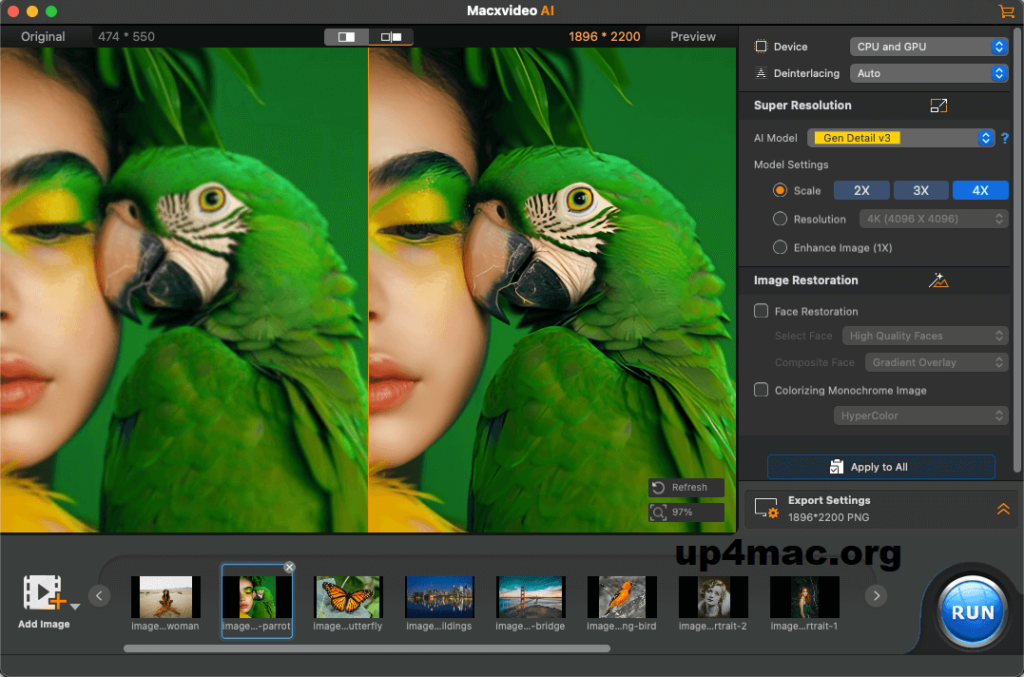
Macxvideo AI for Mac is a multimedia software for macOS that uses advanced AI models and GPU acceleration to enhance video and image quality, efficiently handling complex multimedia tasks. It supports a wide range of video formats and resolutions, including high and ultra-high definition content.
Macxvideo AI is the ultimate AI-powered video suite for Mac, combining state-of-the-art video and image enhancement with advanced conversion, compression, screen recording, and editing tools. With full GPU acceleration, it delivers a smooth and efficient workflow for both casual and professional creators.
Designed specifically for Mac users, Macxvideo AI combines advanced artificial intelligence technology with intuitive controls. Whether you’re a beginner looking to enhance your home videos or a professional managing 4K and 8K recordings, this software delivers high performance, efficiency, and exceptional output quality.
Key Features of Macxvideo AI for Mac 3.12
Macxvideo AI for Mac is more than just a video converter or editor. It’s an all-in-one AI-powered video processing toolkit. Here are the key features that make it such a powerful solution.
AI Video Enhancement
One of the most impressive features is AI video enhancement. The software uses deep learning algorithms to:
- Convert low-resolution videos to 1080p, 4K, and even 8K
- Reduce noise and graininess
- Improve sharpness and clarity
- Enhance color balance and brightness
- Restore old or damaged footage
This feature is especially useful for recovering old content or enhancing videos recorded on older devices.
AI Frame Interpolation
Macxvideo AI 3.12 supports frame interpolation, which increases the frame rate of videos. For example, you can convert 24 or 30 fps videos to smoother 60 fps or higher frame rates.
Benefits:
- Smoother motion
- Improved playback of sports and action videos
- Better slow-motion effects
This makes it ideal for content creators, gamers, and action videographers.
AI Noise Reduction
Poor lighting conditions often result in noisy recordings. Macxvideo AI includes advanced noise reduction tools that:
- Remove digital noise
- Preserve fine details
- Improve clarity in low-light recordings
This feature significantly improves smartphone videos and action camera footage.
Lossless Video Compression
Large video files can be difficult to store or share. Macxvideo AI offers intelligent compression that reduces file size while maintaining visual quality.
Key Advantages:
- Efficiently compresses 4K and 8K videos
- Optimizes videos for YouTube, Instagram, and TikTok
- Saves storage space on Mac devices
The software guarantees minimal quality loss, making it ideal for professionals.
Video Conversion
Macxvideo AI for Mac 3.12 supports a wide range of video formats, including:
- MP4
- MOV
- MKV
- AVI
- HEVC (H.265)
- H.264
Users can convert videos to be compatible with:
- iPhone
- iPad
- Android devices
- Smart TVs
- Game consoles
Batch processing allows you to convert multiple files simultaneously, saving time.
Screen Recording
Another useful feature is built-in screen recording. Users can:
- Record the entire screen or selected areas
- Capture system audio and microphone input
- Record the webcam simultaneously
- Create tutorials and presentations
This feature is ideal for educators, gamers, and remote professionals.
Basic Video Editing Tools
Macxvideo AI also includes essential editing features:
- Trim and cut
- Crop and resize
- Combine videos
- Add subtitles
- Adjust brightness and contrast
While not a full-fledged professional editor, it efficiently covers essential editing needs.
Hardware Acceleration
Performance is key. The software supports hardware acceleration for:
- Macs with Intel processors
- Apple Silicon (M1, M2, M3 chips)
What’s New in Macxvideo AI for Mac 3.12
Version 3.12 introduces several improvements that optimize overall performance and user experience.
Improved AI Upscaling Engine
The latest version improves the AI upscaling algorithms, delivering:
- Sharper details
- Better texture reconstruction
- More natural color rendering
The update reduces artifacts and improves realism in upscaled videos.
Improved Performance on Apple Silicon
Macxvideo AI 3.12 is optimized for Apple Silicon chips, delivering:
- Faster encoding speeds
- Lower CPU usage
- Improved thermal management
Users of MacBook Air, MacBook Pro, iMac, or Mac Studio with M-series chips will notice significant performance improvements.
Stability and Bug Fixes
This update addresses:
- Minor errors during batch processing
- Audio synchronization issues
- Improved format compatibility
These improvements make the software more reliable for long-term projects.
Enhanced User Interface
The interface has been optimized for greater usability:
- Cleaner design
- Simplified workflow
- Faster navigation between modules
System Requirements
- MacOS 12 Monterey or later
- Apple M1/M2/M3 chip or Intel i5/i7 processor
- 8 GB of RAM or more
- SSD storage for faster processing
- Dedicated GPU (for Intel-based Macs)
Advantages and Disadvantages
Every software has its advantages and disadvantages. Here’s a general overview of Macxvideo AI for Mac 3.12.
Advantages
- Complete all-in-one video toolkit
- Advanced AI-powered video enhancement and scaling
- Smooth frame interpolation
- Efficient video compression
- Wide format support
- Optimized for Apple Silicon
- Intuitive interface
- Batch processing support
Disadvantages
- Advanced AI features may require more system resources
- Not a complete professional video editing suite
- Premium features require a paid license
Conclusion
Macxvideo AI for Mac 3.12 stands out as a powerful AI-powered video enhancement and processing tool, designed specifically for macOS users. With advanced features such as AI upscaling, frame interpolation, noise reduction, compression, and format conversion, it offers a complete solution for modern video workflows.
Leave a Reply