
Steinberg SpectraLayers Pro v12.0.40 for MacOS 2026

Steinberg SpectraLayers Pro for macOS v12.0.40 is a professional spectral audio editing application designed for sound engineers, music producers, audio restorers, and post-production professionals. Unlike traditional waveform editors, SpectraLayers Pro allows you to visualize audio in the frequency domain, providing the ability to isolate, repair, enhance, and manipulate individual sound elements with extreme precision.
Part of Steinberg’s suite of advanced audio tools, SpectraLayers Pro integrates seamlessly with most digital audio workstations (DAWs) and is widely used in music production, film post-production, broadcasting, and audio forensics. The macOS version is optimized for Apple hardware, delivering smooth performance, precise processing, and a streamlined workflow suitable for both creative users and technical professionals.
With the release of version 12.0.40, Steinberg continues to improve SpectraLayers Pro through workflow optimizations, enhanced algorithms, and increased performance. This article provides a comprehensive overview of SpectraLayers Pro for macOS, covering its key features, latest updates, system requirements, advantages, limitations, and overall value.
Key Features of Steinberg SpectraLayers Pro:
Advanced Spectral Editing
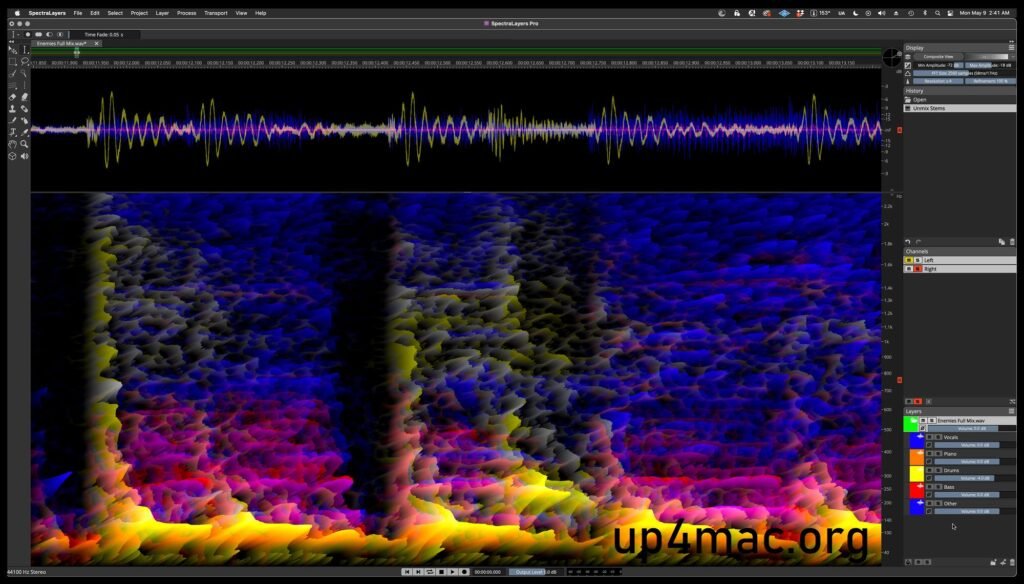
SpectraLayers Pro is built on a powerful spectral editing engine. Audio is displayed as a time-frequency spectrogram, allowing users to visually identify and modify specific sounds such as vocals, noise, reverb, or unwanted artifacts. This approach offers far more precise control than traditional waveform-based editing.
AI-Assisted Sound Demixing
SpectraLayers Pro includes intelligent demixing tools that make it easy to separate complex audio files into their individual components. Users can extract vocals, instruments, ambience, or noise from an audio mix, making it ideal for remixing, restoration, and sound design. These tools significantly reduce manual editing time while maintaining professional quality.
Precise Selection Tools
The software offers a wide range of selection tools, including frequency brushes, harmonic selection, transient detection, and time-based selection modes. These tools enable precise edits, ensuring that changes affect only the desired parts of the audio. Audio Restoration and Repair
SpectraLayers Pro is widely used for audio cleanup and restoration. It offers dedicated tools for removing clicks, pops, hums, hisses, and background noise. Furthermore, it can repair distorted audio tracks, reduce reverb, and improve dialogue clarity, making it a reliable solution for audio archiving and forensic analysis.
Multi-track and Layer-based Workflow
The layer-based editing environment enables non-destructive editing by separating the audio into different layers. Each layer can be processed independently, providing greater flexibility and creative control. This workflow is especially useful for complex audio projects with numerous layered elements.
Seamless DAW Integration
SpectraLayers Pro integrates seamlessly with Steinberg Cubase and Nuendo, as well as other major digital audio workstations (DAWs), using common file formats. Audio transfers are seamless, allowing users to integrate spectral editing into their production or post-production workflows.
High-quality processing algorithms
Steinberg’s advanced processing algorithms ensure transparent and natural edits. Whether isolating a voice or reducing noise, SpectraLayers Pro preserves audio fidelity, essential for professional-quality projects.
What’s New in SpectraLayers Pro v12.0.40?
Improved Performance on macOS
Version 12.0.40 introduces performance optimizations specifically designed for macOS systems. Better memory management and increased CPU efficiency result in faster processing times and smoother operation, especially on Macs with Apple Silicon.
Improved Demixing Accuracy
This update refines the audio demixing algorithms, providing more precise separation of audio elements. This improvement is particularly noticeable in complex mixes, where frequency overlap previously caused problems.
Workflow and Interface Enhancements
SpectraLayers Pro v12.0.40 incorporates subtle but significant improvements to the user interface. Tool responsiveness, visual clarity, and navigation have been optimized, allowing users to work more efficiently during long editing sessions.
Stability and Bug Fixes
This release focuses on overall stability, addressing known issues from previous versions. Users will experience fewer crashes, more reliable sessions, and improved compatibility with current macOS versions.
Enhanced Audio Repair Tools
Audio repair processes have been optimized, delivering cleaner results by eliminating unwanted noise, reverberation, and artifacts. These improvements make SpectraLayers Pro even more reliable for professional restoration tasks.
You Can Also Download: SketchUp Pro v26.1.188 for Mac
System Requirements:
- Operating System: macOS (latest version)
- Processor: Apple Silicon (M1, M2, or later) or Intel Core i7 or later
- RAM: Minimum 16 GB
- Storage: SSD with at least 5 GB of free space
- Screen Resolution: 1920 × 1080 or higher
- Audio Interface: Professional audio interface compatible with Core Audio
Advantages and Disadvantages
Advantages
- Cutting-edge spectral audio editing features
- High-precision audio separation and demixing tools
- Excellent audio restoration and repair features
- Non-destructive, layer-based workflow
- Seamless integration with Steinberg digital audio workstations
- Performance optimized for macOS and Apple Silicon
Disadvantages
- Steep learning curve for beginners
- Requires relatively powerful hardware for optimal performance
- Designed primarily for professionals, not for casual use
Conclusion:
Steinberg SpectraLayers Pro for macOS v12.0.40 stands out as one of the most advanced spectral audio editing solutions on the market. Its ability to visualize and manipulate sound at the frequency level opens up possibilities unmatched by traditional audio editing software. From detailed audio restoration and creative sound design to professional post-production, SpectraLayers Pro guarantees precision, flexibility, and reliability.
Leave a Reply