
VideoProc Converter AI 8.8 for MacOS Download

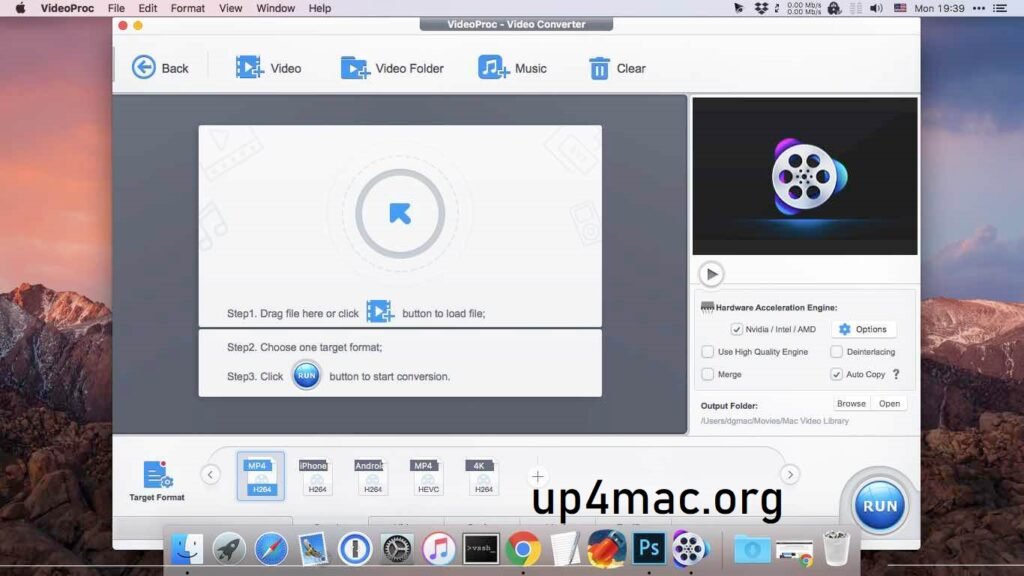
VideoProc Converter 8.8 for Mac is a comprehensive multimedia tool designed to meet the needs of both novice and professional users who require high-performance video conversion and editing capabilities. With a sleek and intuitive interface, the software is designed to simplify complex tasks such as converting large video files, compressing media files without loss of quality, and downloading content from online platforms. The latest version further enhances the user experience by offering increased speed, improved hardware acceleration, and support for cutting-edge video formats, including 4K and 8K. Whether you’re looking to convert a simple video or edit one for a professional project, VideoProc 8.8 delivers the power, versatility, and ease of use that make it an essential tool for any Mac user working with multimedia content.
VideoProc Converter has been a popular choice among Mac users thanks to its intuitive interface and compatibility with a wide variety of formats. The latest version, 8.8, offers even more features with improved performance and functionality. In this article, we’ll explore the main features, recent updates, system requirements, and the pros and cons of using VideoProc Converter 8.8 for Mac.
Key Features of VideoProc Converter 8.8 for Mac
Wide Format Compatibility
VideoProc Converter AI 8.8 supports virtually all major video and audio formats. Whether you’re working with MP4, MOV, AVI, MKV, or FLAC, this software can convert, edit, and optimize your media files without any loss of quality. This makes it the ideal solution for both professionals and casual users who work with various types of media.
High-Speed Video Conversion
One of the standout features of VideoProc Converter 8.8 is its ability to deliver ultra-fast conversion speeds. The software utilizes advanced hardware acceleration technologies, including support for Intel Quick Sync, NVIDIA CUDA, and AMD, ensuring your videos are converted in record time without compromising quality.
Video Editing Features
Beyond simple conversion, VideoProc Converter 8.8 includes a built-in video editor. This allows users to trim, crop, rotate, merge, and apply effects to videos before conversion. You can also adjust audio settings, add subtitles, or modify video resolution.
Batch Conversion
For users with large media collections, batch conversion is a lifesaver. VideoProc Converter 8.8 supports batch processing, meaning you can convert multiple files simultaneously, saving you time and effort.
Compression and Resizing Tools
VideoProc Converter also offers the option to compress and resize videos. If you need to reduce file sizes for easy sharing or uploading, this feature is invaluable. It ensures your media files maintain high quality while fitting into a smaller file size.
Download and Record Online Videos
VideoProc Converter 8.8 allows you to download videos from popular streaming platforms like YouTube, Vimeo, and Dailymotion. Additionally, it supports screen recording, making it useful for capturing webinars, tutorials, or gameplay footage.
Lossless Audio Conversion
For audiophiles or anyone who works with sound, VideoProc Converter 8.8 offers the ability to convert audio files without any loss of quality. It supports all major audio formats, including MP3, WAV, AAC, FLAC, and more.
Hardware Acceleration Support
With full hardware acceleration support, this version of VideoProc delivers faster conversion speeds without overloading your Mac’s CPU. This ensures smoother performance and less waiting time.
What’s new in VideoProc Converter 8.8 for Mac?
The VideoProc Converter 8.8 update for Mac includes several improvements and new features to optimize the user experience and overall functionality.
Improved Conversion Engine
Version 8.8 incorporates an improved conversion engine, which speeds up and optimizes conversions. The software now supports a greater number of file formats, allowing it to handle the latest video codecs and their corresponding updates.
Enhanced User Interface
The interface has been optimized for an even more intuitive user experience. The redesigned layout makes it easier to navigate between different functions, including video editing tools, conversion options, and video downloaders.
Expanded Hardware Acceleration
In addition to existing hardware acceleration technologies, version 8.8 now integrates more advanced GPU support, optimizing the conversion process and improving performance on Mac systems with newer hardware.
Extended Support for 4K and 8K Video Conversion
With the growing popularity of 4K and 8K video, VideoProc Converter 8.8 adds support for even more high-definition formats. Whether you’re converting, editing, or compressing ultra-high-definition video, the software can now handle the demands of 4K and 8K content with ease.
Improved Subtitle Management
For users who require subtitles, version 8.8 includes enhanced functionality. The software now offers greater control over subtitle settings, including the ability to add, remove, or customize subtitles with greater precision.
System Requirements
- Operating System: macOS 10.14 (Mojave) or later
- Processor: Intel Core i5 or better (or equivalent AMD processor)
- RAM: 4 GB or more
- Hard Disk Space: 500 MB or more
Advantages and Disadvantages of VideoProc Converter 8.8 for Mac
Advantages
- Fast and efficient: Thanks to hardware acceleration, conversions are significantly faster, saving valuable time.
- Wide format compatibility: The software supports a wide range of video and audio formats, ensuring compatibility with almost any media file.
- Built-in editor: The integrated video editor is an excellent option for those who need to make quick edits before converting their videos.
- Intuitive interface: The software is intuitive, even for beginners, with a simple drag-and-drop interface.
- High-quality output: VideoProc Converter guarantees high-quality video and audio throughout the conversion process.
Disadvantages
- Price: While the software offers a free trial, the full version requires a paid license, which may be somewhat expensive for occasional users.
- Limited advanced editing features: Although it offers basic video editing, those looking for more sophisticated editing tools may find it limited.
- No cloud storage support: Unlike some competitors, VideoProc Converter does not offer direct integration with cloud storage platforms to facilitate file transfer.
Conclusion
VideoProc Converter 8.8 for Mac is a powerful and versatile tool for anyone who needs to convert, edit, and manage video and audio files. Its wide range of supported formats, fast conversion speeds, and hardware acceleration make it a top choice for both casual and professional users. While the price may be a drawback for some, the features and performance this software offers make it a worthwhile investment for those who frequently work with multimedia files. Whether you’re looking to convert files, edit videos, or download online content, VideoProc Converter 8.8 is an excellent all-in-one solution.
Leave a Reply