
Wondershare Recoverit 14.0.8.16 Multilingual MacOS 2026

Wondershare Recoverit for Mac is data recovery software for Mac computers. It helps recover lost or deleted files from internal drives, external storage, memory cards, and more. The software supports a wide range of file types, from documents and photos to videos and audio files. It even works on formatted drives or damaged storage.
Wondershare Recoverit for macOS is a professional data recovery software designed to help Mac users recover deleted, lost, or formatted files from internal drives, external storage devices, SD cards, USB drives, and even locked systems.
You can recover lost, deleted, damaged, or formatted Mac data from hard drives, iPods, USB drives, SD cards, digital cameras, mobile phones, and MP3 and MP4 players. Compatible with HFS+, FAT16/32, and NTFS file system volumes, this non-destructive file recovery software ensures safe Mac file recovery without altering the original data stored on your Mac or any other storage media. The versatile preview feature lets you test your Mac data recovery beforehand.
Key Features of Wondershare Recoverit for Mac
1. Advanced Data Recovery Technology
One of the main reasons users choose Wondershare Recoverit is its advanced scanning engine. It offers:
- Quick scanning of recently deleted files
- Deep scanning of formatted or damaged drives
- AI-powered file reconstruction for complex data loss cases
This dual-scan approach ensures efficient recovery of even deeply buried files.
2. Support for Over 1000 File Types
- Wondershare Recoverit supports a wide range of file formats, including professional formats used in the creative industries. Whether you’re a photographer, video editor, student, or business user, you can recover virtually any type of file.
3. Recovery from Multiple Devices
The software supports recovery from:
- Mac internal hard drives (HDD/SSD)
- External hard drives
- USB flash drives
- SD cards
- Digital cameras
- Damaged Mac systems
This makes it a comprehensive data recovery solution for macOS.
4. Video Repair Feature
- A standout feature of Wondershare Recoverit is its built-in video repair tool. If your video files are corrupted due to sudden system shutdowns or storage errors, the software can repair and restore them to a playable state.
This feature is especially useful for content creators and videographers.
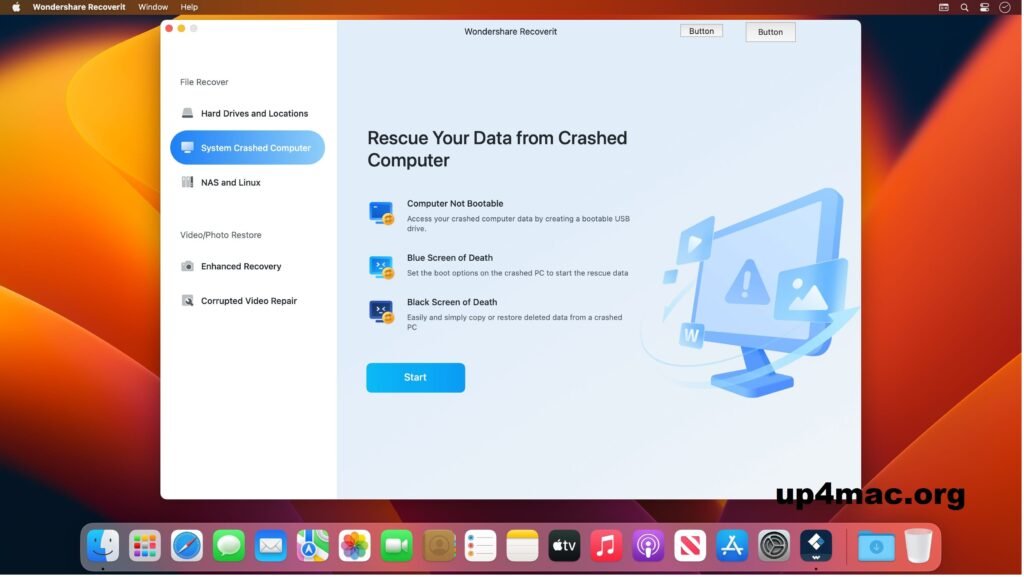
5. Recovery from System Failures
- If your Mac won’t boot, Wondershare Recoverit allows you to create a bootable USB drive. This enables data recovery even when the operating system is unresponsive.
This feature significantly increases your chances of recovering critical files in an emergency.
6. User-Friendly Interface
Despite its powerful recovery capabilities, the software offers a clear and intuitive interface. The step-by-step recovery process makes it easy to use, even for beginners without technical knowledge.
The recovery process typically includes:
- Select location
- Scan device
- Preview files
- Recover data
7. Preview before recovery
- Another useful feature is file preview. Before restoring files, users can preview photos, documents, and videos. This ensures that only what is needed is recovered, saving time and storage space.
What’s new in version 14.0.8.16?
The latest version of Wondershare Recoverit for macOS includes several performance improvements.
Faster Scanning
- Version 14.0.8.16 features optimized scanning algorithms that significantly reduce scan time without compromising accuracy.
Improved macOS Compatibility
- The software now offers greater compatibility with the latest macOS versions, including better support for Apple Silicon (M1, M2, and newer chips).
More Stable Video Repair
- The video repair module has been refined to handle larger files and more complex corruption scenarios.
Improved File Sorting and Filtering
The updated interface allows users to filter files by:
- File Type
- Modification Date
- File Size
- Path
This improvement optimizes user efficiency during the recovery process.
Performance Optimization
- Memory usage and system resource management have been optimized to ensure smoother operation, even on older Mac devices.
System Requirements
For optimal performance, especially during deep scans and the recovery of large amounts of data:
- Operating System: Latest version of macOS
- Processor: Intel multi-core or Apple M1/M2/M3 chip
- RAM: 8 GB or more
- SSD storage for faster scans
- Stable internet connection for updates
Advantages and Disadvantages
Advantages
- High recovery rate
- Compatible with over 1000 file formats
- Deep and quick scan options
- Built-in video repair tool
- Bootable recovery for damaged Macs
- Clear and intuitive interface
- Compatible with Apple Silicon
Disadvantages
- Deep scans can be slow on large drives
- The free version has limited recovery capabilities
- Premium features require a paid license
Conclusion
Data loss can happen unexpectedly, but with the right tools, recovery is usually possible. Wondershare Recoverit for macOS 14.0.8.16 stands out as a powerful, reliable, and easy-to-use data recovery solution.
With advanced scanning technology, support for over 1,000 file types, fail-safe recovery features, and built-in video repair, it offers a comprehensive solution for virtually any data loss scenario. Furthermore, its compatibility with modern macOS systems and Apple Silicon future-proofs it.
Homepage:https://up4mac.org/
Leave a Reply