
XnViewMP 1.9.10 for MacOS Download

XnViewMP for Mac 1.9.10 is a powerful and versatile image viewer, organizer, and converter designed to meet the needs of both casual and professional users. Whether you manage personal photos, work on digital art, or handle large batches of images for business projects, XnViewMP offers a comprehensive solution. Its cross-platform compatibility and extensive format support make it one of the most reliable image management tools available for macOS users.
Version 1.9.10 introduces performance and stability improvements that further solidify its reputation as a dependable image viewer and converter. With support for hundreds of image formats and robust file management capabilities, XnViewMP for Mac continues to stand out in the competitive image management software market.
Key Features of XnViewMP for Mac 1.9.10
XnViewMP for Mac is widely recognized for its comprehensive feature set. Below are the most important features that make it the preferred image management software for Mac users.
1. Broad Image Format Support
One of XnViewMP’s standout features is its support for over 500 image formats and the ability to export to more than 70 formats. This makes it extremely useful for photographers, designers, and content creators who frequently work with various file types.
Supported formats include:
- JPEG, PNG, GIF
- TIFF, BMP
- Camera RAW formats
- PSD (Adobe Photoshop files)
- WebP and many others
This broad support ensures that users rarely encounter incompatible files, making XnViewMP a highly reliable image viewer for Mac.
2. Advanced Image Viewer
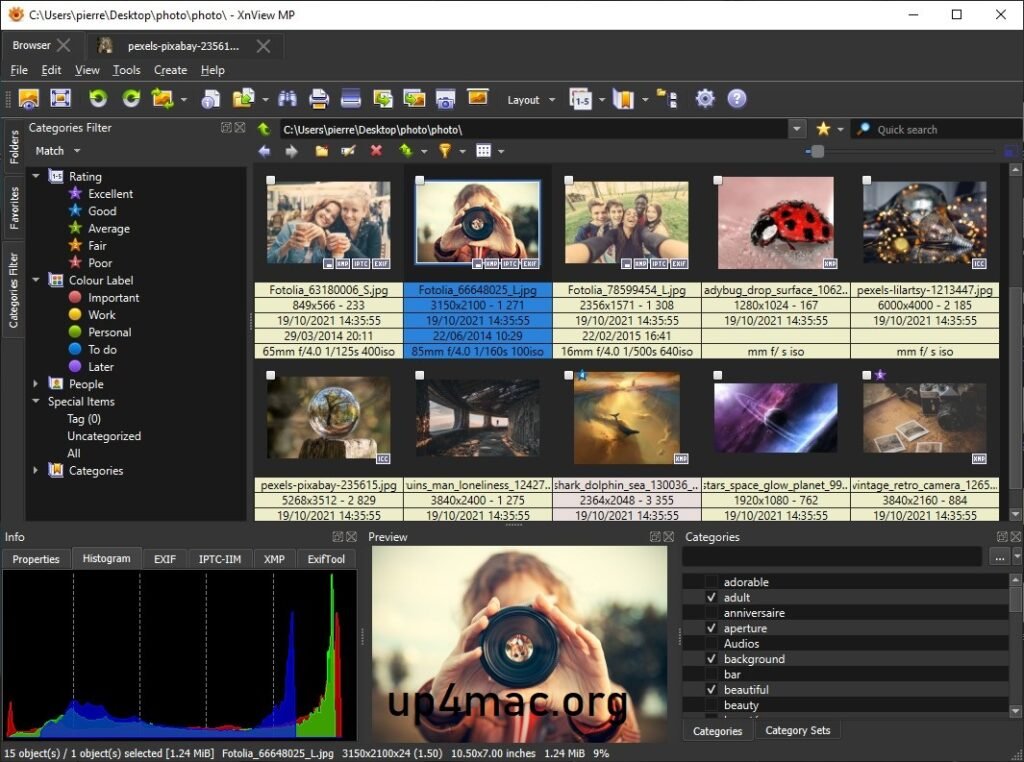
XnViewMP for Mac offers a fast and responsive image viewing experience. Users can browse images in thumbnail view, full-screen mode, or film strip mode. It also provides smooth zoom, rotation, and slideshow options.
Key viewing features include:
- Full-screen preview
- Customizable layout
- Multi-tab navigation
- Side-by-side image comparison
These features make reviewing and selecting images easier, especially when managing large collections.
3. Powerful Batch Processing
Batch processing is one of the most valuable features of XnViewMP for Mac 1.9.10. It allows users to process multiple images simultaneously, saving time and effort.
Batch operations include:
- Batch renaming
- Batch resizing
- Batch format conversion
- Adding watermarks
- Metadata editing
This is especially useful for photographers and digital marketing professionals who need to prepare large volumes of images for websites or client projects.
4. Image Editing Tools
While XnViewMP isn’t a full-fledged photo editing suite, it offers essential editing tools that cover most basic needs. Users can make quick adjustments without switching applications.
Editing features include:
- Crop and resize
- Rotate and flip
- Adjust brightness, contrast, and saturation
- Remove red-eye
- Color correction
These tools are ideal for making quick enhancements and corrections.
5. Metadata and File Management
Efficient file organization is crucial when working with large image libraries. XnViewMP for Mac excels in this area by offering advanced metadata management.
Users can:
- View and edit EXIF, IPTC, and XMP metadata
- Add ratings and tags
- Use categories and keywords
- Search using metadata filters
This simplifies and structures the organization of digital assets.
6. Cross-Platform Compatibility
- XnViewMP is available for multiple operating systems, including macOS, Windows, and Linux. This cross-platform compatibility ensures a smooth workflow across all devices.
7. Customizable Interface
- Another major advantage is the customizable user interface. Users can modify panels, toolbars, and the layout to suit their workflow preferences.
What’s New in XnViewMP for Mac 1.9.10
Version 1.9.10 introduces several improvements to optimize performance, compatibility, and user experience.
Performance Improvements
- The latest version offers faster loading of large image folders. This is especially noticeable when working with high-resolution RAW files or extensive image libraries.
Optimized memory management ensures smoother operation, even on older Mac systems.
Improved Stability
- XnViewMP 1.9.10 includes bug fixes that resolve minor glitches and interface issues reported in previous versions. As a result, the software now runs more reliably during long editing or batch processing sessions.
Updated Format Support
- The software has improved compatibility with the latest image formats and updated camera RAW profiles. This ensures compatibility with modern cameras and devices.
User Interface Improvements
- Minor adjustments have been made to the user interface to improve usability. The icons and menu structures are more intuitive, which improves the overall efficiency of the workflow.
You Can Also Download: Money Pro for Mac
System Requirements
Before installing XnViewMP for Mac, it is important to ensure that your system meets the minimum requirements.
- Minimum Requirements
- Operating System: macOS 10.13 (High Sierra) or later
- Processor: Mac with an Intel or Apple Silicon processor (via the Compatibility Layer)
- RAM: Minimum 2 GB (4 GB recommended)
- Storage: At least 200 MB of free disk space
- Display: 1280×800 resolution or higher
Advantages and Disadvantages
Like any software, XnViewMP has its advantages and disadvantages. Understanding both can help you decide if it suits your needs.
Advantages
- Supports over 500 image formats
- Powerful batch processing tools
- Lightweight and fast
- Advanced metadata editing
- Customizable interface
- Free for personal use
Disadvantages
- The interface may seem outdated to some users
- Limited advanced photo editing features
- Steady learning curve for beginners due to the large number of options
Conclusion
XnViewMP for Mac 1.9.10 remains one of the most versatile and powerful image viewing and management tools available for macOS users. With broad format support, efficient batch processing, customizable interface options, and improved stability in the latest version, it’s ideal for a wide range of users, from casual photographers to professionals managing large image libraries.
Homepage:https://www.xnview.com/en/xnview-mp/
Leave a Reply