
Pixelmator Pro 3.7.1 for MacOS Download
Pixelmator Pro 3.7.1 for Mac is a powerful and modern image editing application designed exclusively for macOS. Renowned for its intuitive interface, optimized performance, and professional editing tools, Pixelmator Pro has established itself as a leading alternative to traditional photo editing software. Whether you’re a graphic designer, photographer, content creator, or casual user, this versatile application offers a smooth editing experience, specifically designed for Mac systems.
Pixelmator Pro is a program whose performance, usability, and features are constantly being improved. The latest version focuses on workflow optimization, bug fixes, and better compatibility with the latest macOS versions. This comprehensive guide presents its main features, recent updates, system requirements, advantages and disadvantages, and all the information you need before using it.
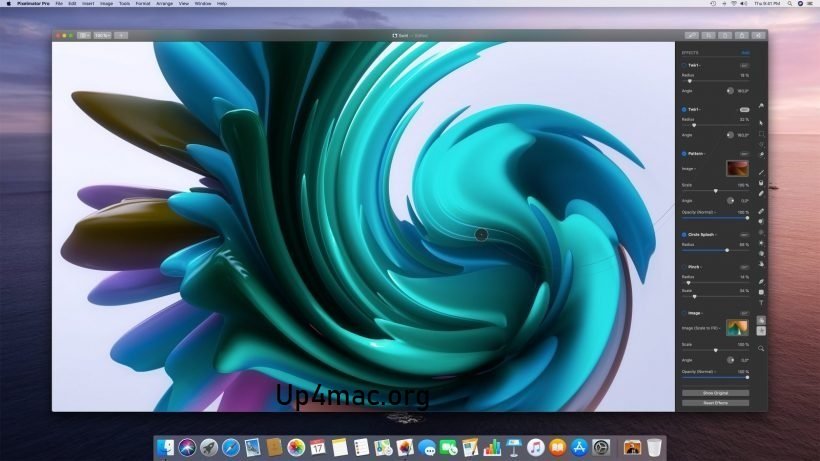
Pixelmator Pro is an incredibly powerful, elegant, and easy-to-use image editor designed exclusively for Mac.With its wide range of professional-quality, non-destructive image editing tools, Pixelmator Pro lets you enhance your photos, create stunning compositions and designs, draw, paint, apply striking effects, design beautiful text, and retouch your images in every way imaginable.
Key Features of Pixelmator Pro for Mac 3.7.1:
Pixelmator Pro 3.7.1 is packed with professional tools designed for both beginners and advanced users. Below are the most notable features that make it one of the best Mac image editing software options available today.
1. Advanced Photo Editing Tools:
Pixelmator Pro provides a complete set of non-destructive editing tools. Users can adjust:
- Exposure, brightness, and contrast
- Color balance and white balance.
- Saturation and vibration.
- Shadows and highlights.
- Curves and levels.
2. AI-Powered Editing with Machine Learning:
One of the standout features of Pixelmator Pro is its integration of machine learning technologies. These AI-powered tools include:
- ML Enhance for automatic photo improvement.
- background removal.
- Super Resolution for image upscaling.
- Smart object selection.
3. Professional Design and Layout Tools:
Beyond photo editing, Pixelmator Pro is also an excellent graphic design tool. It supports:
- Vector graphics editing.
- Text tools with advanced typography controls.
- Shape tools and customizable styles.
- Smart guides and alignment tools.
4. Layer-Based Editing System:
The layer-based editing system is intuitive and powerful. Users can:
- Create multiple layers.
- Use blending modes.
- Add masks and clipping masks.
- Organize projects efficiently.
5. RAW Photo Support:
Professional photographers will appreciate the full RAW file support. Pixelmator Pro 3.7.1 supports RAW images from hundreds of camera models. Additionally, it provides high-quality color adjustments and lens correction tools to enhance RAW images efficiently.
6. Seamless macOS Integration
Since Pixelmator Pro is built exclusively for Mac, it integrates smoothly with:
- iCloud Drive
- Finder extensions
- photos app
- Drag-and-drop functionality
Furthermore, it supports Apple Silicon processors, ensuring optimized performance on modern Mac devices.
What’s New in Pixelmator Pro 3.7.1?
- Update 3.7.1 focuses primarily on improvements to stability, compatibility, and performance.
- it doesn’t introduce any major new tools.
- it does significantly improve the overall editing experience.
You Can Also Download: BlueHarvest 8.4 for Mac
Improved macOS Compatibility
- Pixelmator Pro 3.7.1 ensures smooth performance on the latest versions of macOS. Users can expect greater stability and fewer crashes, especially when handling large or multi-layered files.
Performance Improvements
- The latest update optimizes rendering speed and filter application. As a result, editing workflows are smoother and more responsive, even when working with RAW or high-resolution files.
Bug Fixes and Stability Improvements
Version 3.7.1 addresses several minor bugs reported in previous versions. These fixes improve:
- File export reliability.
- Layer handling accuracy.
- Text tool responsiveness.
- Overall system stability.
As a result, users benefit from a more consistent and reliable editing experience.
System Requirements for Pixelmator Pro 3.7.1
Before installing Pixelmator Pro 3.7.1 for Mac, ensure your system meets the following requirements:
Minimum Requirements
- macOS 13 Ventura or later.
- Mac with an Apple Silicon or Intel processor.
- 8 GB of RAM (16 GB recommended for large projects).
- 2 GB of available storage space.
Recommended Configuration
Mac with an Apple Silicon processor for optimal performance.
- 16 GB of RAM or more.
- SSD storage for faster file management.
Meet these system requirements to ensure smooth performance and optimal editing.
Pros and Cons of Pixelmator Pro 3.7.1 for Mac:
Pros:
- Clean and user-friendly interface.
- AI-powered tools for faster editing.
- Non-destructive workflow.
- Strong macOS integration.
- Excellent performance on Apple Silicon.
- Affordable one-time purchase model.
Cons:
- Mac-only (not Windows version).
- Limited advanced 3D design tools.
- Not as industry-standard as some older competitors.
- May lack some niche professional plugins.
Although there are minor limitations or some benefits clearly outweigh the drawbacks for most users.
Conclusion
Pixelmator Pro 3.7.1 for Mac is one of the best image editing programs available for macOS users. With its powerful, AI-powered editing tools, non-destructive workflow, and seamless Apple integration, it offers exceptional value for both executives and professionals.
Hompage:https://up4mac.org/
Leave a Reply